<?xml version="1.0" encoding="utf-8"?><feed xmlns="http://www.w3.org/2005/Atom" ><generator uri="https://jekyllrb.com/" version="4.4.1">Jekyll</generator><link href="https://anthonybruno.dev/feed.xml" rel="self" type="application/atom+xml" /><link href="https://anthonybruno.dev/" rel="alternate" type="text/html" /><updated>2026-01-10T23:29:50+00:00</updated><id>https://anthonybruno.dev/feed.xml</id><title type="html">Anthony Bruno</title><subtitle>Anthony Bruno - Software Engineer</subtitle><author><name>Anthony Bruno</name></author><entry><title type="html">How I’m learning Clojure in 2024</title><link href="https://anthonybruno.dev/2024/06/10/How-Im-learning-Clojure-in-2024/" rel="alternate" type="text/html" title="How I’m learning Clojure in 2024" /><published>2024-06-10T00:00:00+00:00</published><updated>2024-06-10T00:00:00+00:00</updated><id>https://anthonybruno.dev/2024/06/10/How-Im-learning-Clojure-in-2024</id><content type="html" xml:base="https://anthonybruno.dev/2024/06/10/How-Im-learning-Clojure-in-2024/"><![CDATA[<p>I’ve recently been learning a bit of Clojure and it’s been a lot of fun!
I thought I would note down what has been useful for me, so that it might help others as well.</p>

<h2 id="jumping-right-in">Jumping right in</h2>
<p><a href="https://tryclojure.org/">https://tryclojure.org/</a> is a great intro to the language. It provides a
REPL and a tutorial that takes you through the basic features of Clojure.</p>

<p>Importantly, it forces you to get used to seeing lots of <code class="language-plaintext highlighter-rouge">(</code> and <code class="language-plaintext highlighter-rouge">)</code>!</p>

<h2 id="doing-exercises">Doing exercises</h2>
<p>Exercism provides small coding challenges for a bunch of languages, including <a href="https://exercism.org/tracks/clojure">Clojure</a>.
Unlike other platforms (<em>cough</em> leetcode <em>cough</em>), Exercism is focused on learning and I found it a
great way to practice writing Clojure.</p>

<p>It provides a code editor and evaluates each challenge when you submit. There’s also a way to submit
answers locally from your computer, but I found it quicker just to use the website.</p>

<h2 id="editor-setup">Editor setup</h2>
<p>I ended up setting up Neovim for developing locally. This guide was a great inspiration:
<a href="https://endot.org/2023/05/27/vim-clojure-dev-2023/">https://endot.org/2023/05/27/vim-clojure-dev-2023/</a>, although I did end up going with something a little bit simpler.</p>

<p>My .vimrc can be seen
<a href="https://github.com/AussieGuy0/dotfiles/blob/e25b8da7c01ea1358723a19ca1319cab4888beff/.vimrc">here</a>
but probably the most important plugin is <a href="https://github.com/Olical/conjure">Conjure</a>, which
provides REPL integration in Neovim.</p>

<p>The REPL is one of the big differences compared to programming in other
languages. Basically, you start a REPL in the project directory and then you can evaluate code in
your editor in that REPL.</p>

<p>This basically gives you really short iteration cycles, you can ‘play’ with your code, run
tests, reload code in a running app and all without leaving your editor!</p>

<p>To understand REPL driven development, I really liked this <a href="https://www.youtube.com/watch?v=uBTRLBU-83A">video with teej_dv and
lispyclouds</a>. One key thing I learnt was using the
<code class="language-plaintext highlighter-rouge">comment</code> function to be able to evaluate code without affecting the rest of my program.</p>

<div class="language-clojure highlighter-rouge"><div class="highlight"><pre class="highlight"><code><span class="c1">; my super cool function</span><span class="w">
</span><span class="c1">; given a number, adds 2 to it!</span><span class="w">
</span><span class="p">(</span><span class="k">defn</span><span class="w"> </span><span class="n">add-2</span><span class="w">
  </span><span class="p">[</span><span class="n">n</span><span class="p">]</span><span class="w">
  </span><span class="p">(</span><span class="nb">+</span><span class="w"> </span><span class="n">n</span><span class="w"> </span><span class="mi">2</span><span class="p">)</span><span class="w">
</span><span class="p">)</span><span class="w">

</span><span class="c1">; This tells Clojure to ignore what comes next</span><span class="w">
</span><span class="c1">; but it still has to be syntactically correct!</span><span class="w">
</span><span class="p">(</span><span class="nb">comment</span><span class="w">
  </span><span class="p">(</span><span class="nf">add-2</span><span class="w"> </span><span class="mi">3</span><span class="p">)</span><span class="w"> </span><span class="c1">; &lt;-- I can evaluate this to check my add-2 function :)</span><span class="w">
</span><span class="p">)</span><span class="w">
</span></code></pre></div></div>

<p>By opening a REPL and using the Conjure plugin mentioned before I can:</p>

<ul>
  <li><code class="language-plaintext highlighter-rouge">,eb</code>: Evaluate the buffer I am in. Kinda like loading up the file I have opened into the REPL.</li>
  <li><code class="language-plaintext highlighter-rouge">,ee</code>: Evaluate the expression my cursor is under.</li>
  <li><code class="language-plaintext highlighter-rouge">,tc</code>: Run the test my cursor is over.</li>
  <li><code class="language-plaintext highlighter-rouge">,tn</code>: Run all tests in current file.</li>
</ul>

<p>I use the following alias in my <code class="language-plaintext highlighter-rouge">.bash_aliases</code> to easily spin up a REPL:</p>

<div class="language-sh highlighter-rouge"><div class="highlight"><pre class="highlight"><code><span class="c"># From https://github.com/Olical/conjure/wiki/Quick-start:-Clojure</span>
<span class="c"># Don't ask me questions about how this works, but it does!</span>

<span class="nb">alias </span><span class="nv">cljrepl</span><span class="o">=</span><span class="s1">'clj -Sdeps '</span><span class="se">\'</span><span class="s1">'{:deps {nrepl/nrepl {:mvn/version "1.0.0"} cider/cider-nrepl {:mvn/version "0.42.1"}}}\'</span><span class="se">\'</span><span class="s1">' \
    --main nrepl.cmdline \
    --middleware '</span><span class="se">\'</span><span class="s1">'["cider.nrepl/cider-middleware"]'</span><span class="se">\'</span><span class="s1">' \
    --interactive'</span>
</code></pre></div></div>

<h2 id="docs">Docs</h2>
<p>For docs, I really like <a href="https://clojuredocs.org/">https://clojuredocs.org/</a>, which has the docs for
the core library. I like the fact that users can submit code examples, which provides better
information for each function.</p>

<h2 id="projects">Projects</h2>
<p>I’ve currently have 2 projects in Clojure to further my learning.</p>

<ol>
  <li>A bad terminal-based clone(ish) of
<a href="https://store.steampowered.com/app/2379780/Balatro/">Balatro</a>. Balatro is a very addictive deck
builder rougelike game. Doing this has been fun and it feels very natural to ‘build up’ over time.
The source code can be seen <a href="https://github.com/AussieGuy0/balatro-clj">here</a>.</li>
  <li>A application that converts a subreddit into an RSS feed. The idea that this can be a webapp that
produces daily RSS feeds for a collection of subreddits. <a href="https://github.com/AussieGuy0/reddit-to-rss">Source
code</a></li>
</ol>

<h2 id="the-end">The End</h2>
<p>Thanks for reading!</p>]]></content><author><name>Anthony Bruno</name></author><summary type="html"><![CDATA[I’ve recently been learning a bit of Clojure and it’s been a lot of fun! I thought I would note down what has been useful for me, so that it might help others as well.]]></summary></entry><entry><title type="html">Full stack web development in a single Java file: An intro to Javalin and htmx</title><link href="https://anthonybruno.dev/2023/06/11/full-stack-development-in-a-single-java-file/" rel="alternate" type="text/html" title="Full stack web development in a single Java file: An intro to Javalin and htmx" /><published>2023-06-11T00:00:00+00:00</published><updated>2023-06-11T00:00:00+00:00</updated><id>https://anthonybruno.dev/2023/06/11/full-stack-development-in-a-single-java-file</id><content type="html" xml:base="https://anthonybruno.dev/2023/06/11/full-stack-development-in-a-single-java-file/"><![CDATA[<p><img src="/media/htmx-1/banner.png" alt="" /></p>

<h2 id="introduction">Introduction</h2>

<p>In my programming career, I have used a wide variety of frontend frameworks.
From JQuery and Angularjs (not Angular!).
To Vue and React.</p>

<p>A common theme with these was a SPA (Single Page Application) architecture.
The server would respond with JSON, the frontend would parse it, do some javascript-y things, and
ultimately render as html on the page.</p>

<p>But this isn’t cool anymore! There has been a trend towards moving rendering to the server,
demonstrated by technologies like
<a href="https://nextjs.org/">Next.js</a> and <a href="https://www.patterns.dev/posts/react-server-components">React Server
Components</a>.</p>

<p>But did you know that a server can just respond with plain old HTML, without needing to refresh the whole
page and not needing a complicated frontend framework to achieve this?</p>

<p>Enter: <a href="https://htmx.org/">htmx</a>.</p>

<p>htmx is a very basic frontend library, that operates based on special <code class="language-plaintext highlighter-rouge">hx-*</code> attributes on HTML elements.</p>

<p>An example of this is the following (ripped straight off htmx’s homepage):</p>

<div class="language-html highlighter-rouge"><div class="highlight"><pre class="highlight"><code>  <span class="nt">&lt;button</span> <span class="na">hx-post=</span><span class="s">"/clicked"</span> <span class="na">hx-swap=</span><span class="s">"outerHTML"</span><span class="nt">&gt;</span>
    Click Me
  <span class="nt">&lt;/button&gt;</span>
</code></pre></div></div>

<p>This can be described as: “When this button is clicked, make a POST request to /clicked and replace
the button with the HTML response”.</p>

<p>Basically, all of htmx revolves around:</p>
<ul>
  <li>Waiting for some sort of trigger (e.g. clicking a button, submitting a form, typing in a field)</li>
  <li>Making a request to the server</li>
  <li>Replacing an element on the page with the HTML response.</li>
</ul>

<p>This is a <strong>simple, but powerful paradigm.</strong></p>

<p>It simplifies frontend devlopment, making it easy to learn and maintain, without the need for
complex frontend build tools.</p>

<p>In the blog post, I will describe a Java web app stack using:</p>

<ul>
  <li><a href="https://j2html.com">j2html</a></li>
  <li><a href="https://javalin.io/">Javalin</a></li>
  <li><a href="https://htmx.org/">htmx</a></li>
</ul>

<p>to enable fast and simple web app development.
I will explain what each part of the stack does, and how we can put it all together to build a
simple counter app in a single Java file!</p>

<h2 id="dependencies">Dependencies</h2>

<p>If you are using Maven, here’s the list of dependencies that you can chuck in your <code class="language-plaintext highlighter-rouge">pom.xml</code> file.
Don’t worry, this blog post will explain what each of them does!</p>

<div class="language-xml highlighter-rouge"><div class="highlight"><pre class="highlight"><code><span class="c">&lt;!-- Place the below in the &lt;dependencies&gt; section of your pom.xml --&gt;</span>
<span class="nt">&lt;dependency&gt;</span>
    <span class="nt">&lt;groupId&gt;</span>com.j2html<span class="nt">&lt;/groupId&gt;</span>
    <span class="nt">&lt;artifactId&gt;</span>j2html<span class="nt">&lt;/artifactId&gt;</span>
    <span class="nt">&lt;version&gt;</span>1.6.0<span class="nt">&lt;/version&gt;</span>
<span class="nt">&lt;/dependency&gt;</span>
<span class="nt">&lt;dependency&gt;</span>
    <span class="nt">&lt;groupId&gt;</span>io.javalin<span class="nt">&lt;/groupId&gt;</span>
    <span class="nt">&lt;artifactId&gt;</span>javalin<span class="nt">&lt;/artifactId&gt;</span>
    <span class="nt">&lt;version&gt;</span>5.5.0<span class="nt">&lt;/version&gt;</span>
<span class="nt">&lt;/dependency&gt;</span>
<span class="nt">&lt;dependency&gt;</span>
    <span class="nt">&lt;groupId&gt;</span>org.webjars.npm<span class="nt">&lt;/groupId&gt;</span>
    <span class="nt">&lt;artifactId&gt;</span>htmx.org<span class="nt">&lt;/artifactId&gt;</span>
    <span class="nt">&lt;version&gt;</span>1.9.2<span class="nt">&lt;/version&gt;</span>
<span class="nt">&lt;/dependency&gt;</span>
<span class="c">&lt;!-- Defining a logger as Javalin will complain if there is no SL4J logger --&gt;</span>
<span class="nt">&lt;dependency&gt;</span>
    <span class="nt">&lt;groupId&gt;</span>org.slf4j<span class="nt">&lt;/groupId&gt;</span>
    <span class="nt">&lt;artifactId&gt;</span>slf4j-api<span class="nt">&lt;/artifactId&gt;</span>
    <span class="nt">&lt;version&gt;</span>2.0.5<span class="nt">&lt;/version&gt;</span>
<span class="nt">&lt;/dependency&gt;</span>
<span class="nt">&lt;dependency&gt;</span>
    <span class="nt">&lt;groupId&gt;</span>org.slf4j<span class="nt">&lt;/groupId&gt;</span>
    <span class="nt">&lt;artifactId&gt;</span>slf4j-reload4j<span class="nt">&lt;/artifactId&gt;</span>
    <span class="nt">&lt;version&gt;</span>2.0.5<span class="nt">&lt;/version&gt;</span>
<span class="nt">&lt;/dependency&gt;</span>
</code></pre></div></div>

<h2 id="server-side-html-with-j2html">Server side HTML with j2html</h2>
<p>A way to generate HTML in Java is to use a templating engine like
<a href="https://www.thymeleaf.org/">Thymeleaf</a>.
However, this means the template files are outside Java, and as the blog title suggests, we want
everything in Java!</p>

<p>A nice alternative to a templating engine is <strong>j2html</strong>.</p>

<p>j2html is a Java library that allows us to build HTML in a fluent and typesafe manner. If you know HTML, you
know j2html!</p>

<div class="language-java highlighter-rouge"><div class="highlight"><pre class="highlight"><code><span class="kn">import</span> <span class="nn">static</span> <span class="n">j2html</span><span class="o">.</span><span class="na">TagCreator</span><span class="o">.*;</span>

<span class="kd">public</span> <span class="kd">class</span> <span class="nc">Main</span>
  <span class="kd">public</span> <span class="kd">static</span> <span class="kt">void</span> <span class="nf">main</span><span class="o">(</span><span class="nc">String</span><span class="o">[]</span> <span class="n">args</span><span class="o">)</span> <span class="o">{</span>
    <span class="c1">// Fluently build a HTML structure.</span>
    <span class="kt">var</span> <span class="n">content</span> <span class="o">=</span> <span class="n">html</span><span class="o">(</span>
      <span class="n">body</span><span class="o">(</span>
        <span class="n">h1</span><span class="o">(</span><span class="s">"Hello World!"</span><span class="o">)</span>
      <span class="o">)</span>
    <span class="o">);</span>

    <span class="c1">// Let's render that HTML!</span>
    <span class="nc">System</span><span class="o">.</span><span class="na">out</span><span class="o">.</span><span class="na">println</span><span class="o">(</span><span class="n">content</span><span class="o">.</span><span class="na">render</span><span class="o">());</span>
  <span class="o">}</span>
<span class="o">}</span>
</code></pre></div></div>

<p>Output:</p>

<div class="language-html highlighter-rouge"><div class="highlight"><pre class="highlight"><code><span class="nt">&lt;html&gt;&lt;body&gt;&lt;h1&gt;</span>Hello world<span class="nt">&lt;/h1&gt;&lt;/body&gt;&lt;/html&gt;</span>
</code></pre></div></div>

<p>Now, let’s serve that html through a sever. We can do that using <strong>Javalin</strong>.</p>

<h2 id="handling-requests-with-javalin">Handling requests with Javalin</h2>
<p>According to <a href="https://javalin.io/">https://javalin.io/</a>, Javalin is a simple web framework for Java and Kotlin. I agree!</p>

<p>I feel like it is very similar to the <a href="https://expressjs.com/">Express</a> framework for Node.js.
For instance, the following Express code:</p>

<div class="language-js highlighter-rouge"><div class="highlight"><pre class="highlight"><code><span class="c1">// Using Express as an example.</span>
<span class="kd">const</span> <span class="nx">express</span> <span class="o">=</span> <span class="nf">require</span><span class="p">(</span><span class="dl">'</span><span class="s1">express</span><span class="dl">'</span><span class="p">)</span>
<span class="kd">const</span> <span class="nx">app</span> <span class="o">=</span> <span class="nf">express</span><span class="p">()</span>
<span class="kd">const</span> <span class="nx">port</span> <span class="o">=</span> <span class="mi">3000</span>

<span class="nx">app</span><span class="p">.</span><span class="nf">get</span><span class="p">(</span><span class="dl">'</span><span class="s1">/</span><span class="dl">'</span><span class="p">,</span> <span class="p">(</span><span class="nx">req</span><span class="p">,</span> <span class="nx">res</span><span class="p">)</span> <span class="o">=&gt;</span> <span class="p">{</span>
  <span class="nx">res</span><span class="p">.</span><span class="nf">send</span><span class="p">(</span><span class="dl">'</span><span class="s1">Hello World!</span><span class="dl">'</span><span class="p">)</span>
<span class="p">})</span>
<span class="nx">app</span><span class="p">.</span><span class="nf">listen</span><span class="p">()</span>
</code></pre></div></div>

<p>Is the same as the following Javalin code:</p>

<div class="language-java highlighter-rouge"><div class="highlight"><pre class="highlight"><code><span class="kn">import</span> <span class="nn">io.javalin.Javalin</span><span class="o">;</span>

<span class="kd">public</span> <span class="kd">class</span> <span class="nc">Main</span> <span class="o">{</span>
  <span class="kd">public</span> <span class="kd">static</span> <span class="kt">void</span> <span class="nf">main</span><span class="o">(</span><span class="nc">String</span><span class="o">[]</span> <span class="n">args</span><span class="o">)</span> <span class="o">{</span>
    <span class="kt">var</span> <span class="n">app</span> <span class="o">=</span> <span class="nc">Javalin</span><span class="o">.</span><span class="na">create</span><span class="o">()</span>
            <span class="o">.</span><span class="na">get</span><span class="o">(</span><span class="s">"/"</span><span class="o">,</span> <span class="n">ctx</span> <span class="o">-&gt;</span> <span class="n">ctx</span><span class="o">.</span><span class="na">result</span><span class="o">(</span><span class="s">"Hello World"</span><span class="o">))</span>
            <span class="o">.</span><span class="na">start</span><span class="o">();</span>
    <span class="o">}</span>
<span class="o">}</span>
</code></pre></div></div>

<p>Now let’s combine j2html and Javalin.
We can use Javalin’s <code class="language-plaintext highlighter-rouge">Context#html</code> to allow the server to respond with HTML.</p>

<div class="language-java highlighter-rouge"><div class="highlight"><pre class="highlight"><code><span class="kn">import</span> <span class="nn">io.javalin.Javalin</span><span class="o">;</span>
<span class="kn">import</span> <span class="nn">static</span> <span class="n">j2html</span><span class="o">.</span><span class="na">TagCreator</span><span class="o">.*;</span>

<span class="kd">public</span> <span class="kd">static</span> <span class="kt">void</span> <span class="nf">main</span><span class="o">(</span><span class="nc">String</span><span class="o">[]</span> <span class="n">args</span><span class="o">)</span> <span class="o">{</span>
  <span class="c1">// Create a new Javalin instance.</span>
  <span class="c1">// By default it will run on port 8080, but can be changed.</span>
  <span class="kt">var</span> <span class="n">javalin</span> <span class="o">=</span> <span class="nc">Javalin</span><span class="o">.</span><span class="na">create</span><span class="o">();</span>

  <span class="c1">// Handle a GET request to the path "/".</span>
  <span class="n">javalin</span><span class="o">.</span><span class="na">get</span><span class="o">(</span><span class="s">"/"</span><span class="o">,</span> <span class="n">ctx</span> <span class="o">-&gt;</span> <span class="o">{</span>
    <span class="c1">// Build the HTML, and render it.</span>
    <span class="kt">var</span> <span class="n">content</span> <span class="o">=</span> <span class="n">html</span><span class="o">(</span>
            <span class="n">body</span><span class="o">(</span>
              <span class="n">h1</span><span class="o">(</span><span class="s">"Hello world"</span><span class="o">)</span>
            <span class="o">)</span>
    <span class="o">);</span>
    <span class="c1">// We prefix with the doctype to ensure the browser does not use quirks mode.</span>
    <span class="c1">// https://developer.mozilla.org/en-US/docs/Web/HTML/Quirks_Mode_and_Standards_Mode</span>
    <span class="kt">var</span> <span class="n">rendered</span> <span class="o">=</span> <span class="s">"&lt;!DOCTYPE html&gt;\n"</span> <span class="o">+</span> <span class="n">content</span><span class="o">.</span><span class="na">render</span><span class="o">();</span>

    <span class="c1">// Return the html in the response.</span>
    <span class="n">ctx</span><span class="o">.</span><span class="na">html</span><span class="o">(</span><span class="n">rendered</span><span class="o">);</span>
  <span class="o">});</span>

  <span class="n">javalin</span><span class="o">.</span><span class="na">start</span><span class="o">();</span>
<span class="o">}</span>
</code></pre></div></div>

<p>If we run this, we will see some output in the console.</p>

<div class="language-plaintext highlighter-rouge"><div class="highlight"><pre class="highlight"><code> INFO [main] (JavalinLogger.kt:16) - Listening on http://localhost:8080/
 INFO [main] (JavalinLogger.kt:16) - You are running Javalin 5.5.0 (released May 1, 2023).
 INFO [main] (JavalinLogger.kt:16) - Javalin started in 273ms \o/
</code></pre></div></div>

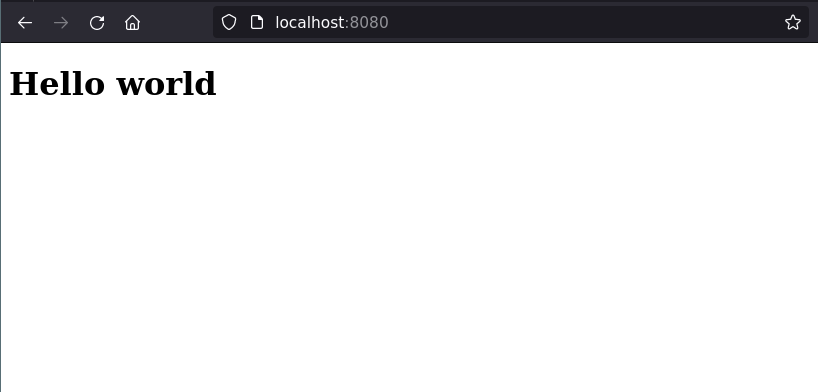
<p>Once you see the “Javalin” started command, we can put in the url <code class="language-plaintext highlighter-rouge">http://localhost:8080</code> into a
browser. This should show something like this:</p>

<p><img src="/media/htmx-1/hello-world.png" alt="" /></p>

<p>Isn’t it beautiful?</p>

<h2 id="interactivity-with-htmx">Interactivity with htmx</h2>
<p>Lastly, lets add some interactivity with htmx!</p>

<p>To add htmx to our project, we can add it as a <a href="https://www.webjars.org/">WebJar</a>.
A WebJar is basically just a way to manage Javascript dependencies using standard Java build tools,
like Maven or Gradle.</p>

<div class="language-xml highlighter-rouge"><div class="highlight"><pre class="highlight"><code><span class="c">&lt;!-- Was in the dependencies at the top of this blog post, but putting
     here in case you forgot! --&gt;</span>
<span class="nt">&lt;dependency&gt;</span>
    <span class="nt">&lt;groupId&gt;</span>org.webjars.npm<span class="nt">&lt;/groupId&gt;</span>
    <span class="nt">&lt;artifactId&gt;</span>htmx.org<span class="nt">&lt;/artifactId&gt;</span>
    <span class="nt">&lt;version&gt;</span>1.9.2<span class="nt">&lt;/version&gt;</span>
<span class="nt">&lt;/dependency&gt;</span>
</code></pre></div></div>

<p>To use this, we need to:</p>
<ol>
  <li>Enable WebJar support in Javalin.</li>
  <li>Include it in our <code class="language-plaintext highlighter-rouge">&lt;head&gt;</code> element of our HTML.</li>
</ol>

<div class="language-java highlighter-rouge"><div class="highlight"><pre class="highlight"><code><span class="kd">public</span> <span class="kd">static</span> <span class="kt">void</span> <span class="nf">main</span><span class="o">(</span><span class="nc">String</span><span class="o">[]</span> <span class="n">args</span><span class="o">)</span> <span class="o">{</span>
  <span class="kt">var</span> <span class="n">javalin</span> <span class="o">=</span> <span class="nc">Javalin</span><span class="o">.</span><span class="na">create</span><span class="o">(</span><span class="n">config</span> <span class="o">-&gt;</span> <span class="o">{</span>
    <span class="c1">// Enable WebJar support.</span>
    <span class="n">config</span><span class="o">.</span><span class="na">staticFiles</span><span class="o">.</span><span class="na">enableWebJars</span><span class="o">();</span>
  <span class="o">});</span>

  <span class="n">javalin</span><span class="o">.</span><span class="na">get</span><span class="o">(</span><span class="s">"/"</span><span class="o">,</span> <span class="n">ctx</span> <span class="o">-&gt;</span> <span class="o">{</span>
    <span class="kt">var</span> <span class="n">content</span> <span class="o">=</span> <span class="n">html</span><span class="o">(</span>
            <span class="n">head</span><span class="o">(</span>
              <span class="c1">// The WebJars path follows the format:</span>
              <span class="c1">// /webjars/&lt;artifactId&gt;/&lt;version&gt;/&lt;path-to-file&gt;</span>
              <span class="c1">// We can find the &lt;path-to-file&gt; via npmjs.com 'Code' view.</span>
              <span class="c1">// For instance: https://www.npmjs.com/package/htmx.org?activeTab=code</span>
              <span class="n">script</span><span class="o">().</span><span class="na">withSrc</span><span class="o">(</span><span class="s">"/webjars/htmx.org/1.9.2/dist/htmx.min.js"</span><span class="o">)</span>
            <span class="o">),</span>
            <span class="n">body</span><span class="o">(</span>
              <span class="n">h1</span><span class="o">(</span><span class="s">"Hello world"</span><span class="o">)</span>
            <span class="o">)</span>
        <span class="o">);</span>
    <span class="kt">var</span> <span class="n">rendered</span> <span class="o">=</span> <span class="s">"&lt;!DOCTYPE html&gt;\n"</span> <span class="o">+</span> <span class="n">content</span><span class="o">.</span><span class="na">render</span><span class="o">();</span>

    <span class="n">ctx</span><span class="o">.</span><span class="na">html</span><span class="o">(</span><span class="n">rendered</span><span class="o">);</span>
  <span class="o">});</span>

  <span class="n">javalin</span><span class="o">.</span><span class="na">start</span><span class="o">();</span>
<span class="o">}</span>
</code></pre></div></div>

<p>Now, let’s start actually using htmx!
For this example, we’ll create a simple counter app.
It will show a number, that can be incremented by pressing a button.</p>

<p>Firstly, let’s create a method that produces the HTML for the count.
This will make a bit more sense later on.</p>

<div class="language-java highlighter-rouge"><div class="highlight"><pre class="highlight"><code>  <span class="c1">// Create a H2 tag with an id.</span>
  <span class="kd">private</span> <span class="nc">H2Tag</span> <span class="nf">createCounterElement</span><span class="o">(</span><span class="kt">int</span> <span class="n">count</span><span class="o">)</span> <span class="o">{</span>
    <span class="k">return</span> <span class="nf">h2</span><span class="o">(</span><span class="s">"count: "</span> <span class="o">+</span> <span class="n">count</span><span class="o">)</span>
        <span class="o">.</span><span class="na">withId</span><span class="o">(</span><span class="s">"counter"</span><span class="o">);</span>
  <span class="o">}</span>
</code></pre></div></div>

<p>Next, we need a way to store the count on the server.
The easiest way is to use an <code class="language-plaintext highlighter-rouge">AtomicInteger</code>.</p>

<p>We can use this count and the <code class="language-plaintext highlighter-rouge">createCounter</code> method we created before in the handler we have:</p>

<div class="language-java highlighter-rouge"><div class="highlight"><pre class="highlight"><code>  <span class="kd">public</span> <span class="kd">static</span> <span class="kt">void</span> <span class="nf">main</span><span class="o">()</span> <span class="o">{</span>
    <span class="kt">var</span> <span class="n">count</span> <span class="o">=</span> <span class="k">new</span> <span class="nc">AtomicInteger</span><span class="o">();</span>
    <span class="n">javalin</span><span class="o">.</span><span class="na">get</span><span class="o">(</span><span class="s">"/"</span><span class="o">,</span> <span class="n">ctx</span> <span class="o">-&gt;</span> <span class="o">{</span>
      <span class="kt">var</span> <span class="n">content</span> <span class="o">=</span> <span class="n">html</span><span class="o">(</span>
          <span class="n">head</span><span class="o">(</span>
              <span class="n">script</span><span class="o">().</span><span class="na">withSrc</span><span class="o">(</span><span class="s">"/webjars/htmx.org/1.9.2/dist/htmx.min.js"</span><span class="o">)</span>
          <span class="o">),</span> <span class="o">(</span>
              <span class="n">body</span><span class="o">(</span>
                  <span class="n">h1</span><span class="o">(</span><span class="s">"Hello world"</span><span class="o">),</span>
                  <span class="n">createCounterElement</span><span class="o">(</span><span class="n">count</span><span class="o">.</span><span class="na">get</span><span class="o">())</span>
              <span class="o">)</span>
          <span class="o">)</span>
      <span class="o">);</span>
      <span class="kt">var</span> <span class="n">rendered</span> <span class="o">=</span> <span class="s">"&lt;!DOCTYPE html&gt;\n"</span> <span class="o">+</span> <span class="n">content</span><span class="o">.</span><span class="na">render</span><span class="o">();</span>
      <span class="n">ctx</span><span class="o">.</span><span class="na">html</span><span class="o">(</span><span class="n">rendered</span><span class="o">);</span>
    <span class="o">});</span>
  <span class="o">}</span>
</code></pre></div></div>

<p>We then need a way for the server to increment this counter.
We can do this by defining a new handler on our server.</p>

<p>Let’s make it accept <code class="language-plaintext highlighter-rouge">POST</code> requests on the path <code class="language-plaintext highlighter-rouge">/increment</code>.
It will increment the count on the server and return only the html for the counter element.
This is where that <code class="language-plaintext highlighter-rouge">createCounterElement</code> method is useful!</p>

<div class="language-java highlighter-rouge"><div class="highlight"><pre class="highlight"><code>    <span class="n">javalin</span><span class="o">.</span><span class="na">post</span><span class="o">(</span><span class="s">"/increment"</span><span class="o">,</span> <span class="n">ctx</span> <span class="o">-&gt;</span> <span class="o">{</span>
      <span class="kt">var</span> <span class="n">newCounter</span> <span class="o">=</span> <span class="n">createCounterElement</span><span class="o">(</span><span class="n">count</span><span class="o">.</span><span class="na">incrementAndGet</span><span class="o">());</span>
      <span class="n">ctx</span><span class="o">.</span><span class="na">html</span><span class="o">(</span><span class="n">newCounter</span><span class="o">.</span><span class="na">render</span><span class="o">());</span>
    <span class="o">});</span>
</code></pre></div></div>

<p>Lastly, and most importantly, we now use htmx to call this <code class="language-plaintext highlighter-rouge">increment</code> handler, and swap out the
relevant counter element on the screen.</p>

<p>To do so, we can define a button with special <code class="language-plaintext highlighter-rouge">hx-*</code> attributes like so:</p>

<div class="language-java highlighter-rouge"><div class="highlight"><pre class="highlight"><code><span class="n">button</span><span class="o">(</span><span class="s">"Increment"</span><span class="o">)</span>
  <span class="o">.</span><span class="na">attr</span><span class="o">(</span><span class="s">"hx-post"</span><span class="o">,</span> <span class="s">"/increment"</span><span class="o">)</span>
  <span class="o">.</span><span class="na">attr</span><span class="o">(</span><span class="s">"hx-target"</span><span class="o">,</span> <span class="s">"#counter"</span><span class="o">)</span>
  <span class="o">.</span><span class="na">attr</span><span class="o">(</span><span class="s">"hx-swap"</span><span class="o">,</span> <span class="s">"outerHTML"</span><span class="o">)</span>
</code></pre></div></div>

<p>To explain each attribute:</p>
<ul>
  <li><a href="https://htmx.org/attributes/hx-post/">hx-post</a>: When clicked, make a <code class="language-plaintext highlighter-rouge">POST</code> request to the <code class="language-plaintext highlighter-rouge">/increment</code> path.</li>
  <li><a href="https://htmx.org/attributes/hx-target/">hx-target</a>: Swap the element with the id <code class="language-plaintext highlighter-rouge">counter</code>.</li>
  <li><a href="https://htmx.org/attributes/hx-swap/">hx-swap</a>: Using <code class="language-plaintext highlighter-rouge">outerHTML</code> means htmx will swap the entire html of the counter element.</li>
</ul>

<p>Putting all the code we have together, we should have something that looks like the following:</p>

<div class="language-java highlighter-rouge"><div class="highlight"><pre class="highlight"><code>  <span class="kd">public</span> <span class="kd">static</span> <span class="kt">void</span> <span class="nf">main</span><span class="o">(</span><span class="nc">String</span><span class="o">[]</span> <span class="n">args</span><span class="o">)</span> <span class="o">{</span>
    <span class="kt">var</span> <span class="n">javalin</span> <span class="o">=</span> <span class="nc">Javalin</span><span class="o">.</span><span class="na">create</span><span class="o">(</span><span class="n">config</span> <span class="o">-&gt;</span> <span class="o">{</span>
          <span class="n">config</span><span class="o">.</span><span class="na">staticFiles</span><span class="o">.</span><span class="na">enableWebjars</span><span class="o">();</span>
        <span class="o">}</span>
    <span class="o">);</span>

    <span class="kt">var</span> <span class="n">counter</span> <span class="o">=</span> <span class="k">new</span> <span class="nc">AtomicInteger</span><span class="o">();</span>
    <span class="n">javalin</span><span class="o">.</span><span class="na">get</span><span class="o">(</span><span class="s">"/"</span><span class="o">,</span> <span class="n">ctx</span> <span class="o">-&gt;</span> <span class="o">{</span>
      <span class="kt">var</span> <span class="n">content</span> <span class="o">=</span> <span class="n">html</span><span class="o">(</span>
          <span class="n">head</span><span class="o">(</span>
              <span class="n">script</span><span class="o">().</span><span class="na">withSrc</span><span class="o">(</span><span class="s">"/webjars/htmx.org/1.9.2/dist/htmx.min.js"</span><span class="o">)</span>
          <span class="o">),</span> <span class="o">(</span>
              <span class="n">body</span><span class="o">(</span>
                  <span class="n">h1</span><span class="o">(</span><span class="s">"Hello world"</span><span class="o">),</span>
                  <span class="n">createCounter</span><span class="o">(</span><span class="n">counter</span><span class="o">.</span><span class="na">get</span><span class="o">()),</span>
                  <span class="n">button</span><span class="o">(</span><span class="s">"Increment"</span><span class="o">)</span>
                      <span class="o">.</span><span class="na">attr</span><span class="o">(</span><span class="s">"hx-post"</span><span class="o">,</span> <span class="s">"/increment"</span><span class="o">)</span>
                      <span class="o">.</span><span class="na">attr</span><span class="o">(</span><span class="s">"hx-swap"</span><span class="o">,</span> <span class="s">"outerHTML"</span><span class="o">)</span>
                      <span class="o">.</span><span class="na">attr</span><span class="o">(</span><span class="s">"hx-target"</span><span class="o">,</span> <span class="s">"#counter"</span><span class="o">)</span>
              <span class="o">)</span>
          <span class="o">)</span>
      <span class="o">);</span>
      <span class="kt">var</span> <span class="n">rendered</span> <span class="o">=</span> <span class="s">"&lt;!DOCTYPE html&gt;\n"</span> <span class="o">+</span> <span class="n">content</span><span class="o">.</span><span class="na">render</span><span class="o">();</span>
      <span class="n">ctx</span><span class="o">.</span><span class="na">html</span><span class="o">(</span><span class="n">rendered</span><span class="o">);</span>
    <span class="o">});</span>

    <span class="n">javalin</span><span class="o">.</span><span class="na">post</span><span class="o">(</span><span class="s">"/increment"</span><span class="o">,</span> <span class="n">ctx</span> <span class="o">-&gt;</span> <span class="o">{</span>
      <span class="kt">var</span> <span class="n">newCounter</span> <span class="o">=</span> <span class="n">createCounter</span><span class="o">(</span><span class="n">counter</span><span class="o">.</span><span class="na">incrementAndGet</span><span class="o">());</span>
      <span class="n">ctx</span><span class="o">.</span><span class="na">html</span><span class="o">(</span><span class="n">newCounter</span><span class="o">.</span><span class="na">render</span><span class="o">());</span>
    <span class="o">});</span>
  <span class="o">}</span>

  <span class="kd">private</span> <span class="kd">static</span> <span class="nc">H2Tag</span> <span class="nf">createCounterElement</span><span class="o">(</span><span class="kt">int</span> <span class="n">count</span><span class="o">)</span> <span class="o">{</span>
    <span class="k">return</span> <span class="nf">h2</span><span class="o">(</span><span class="s">"count: "</span> <span class="o">+</span> <span class="n">count</span><span class="o">)</span>
        <span class="o">.</span><span class="na">withId</span><span class="o">(</span><span class="s">"counter"</span><span class="o">);</span>
  <span class="o">}</span>
</code></pre></div></div>

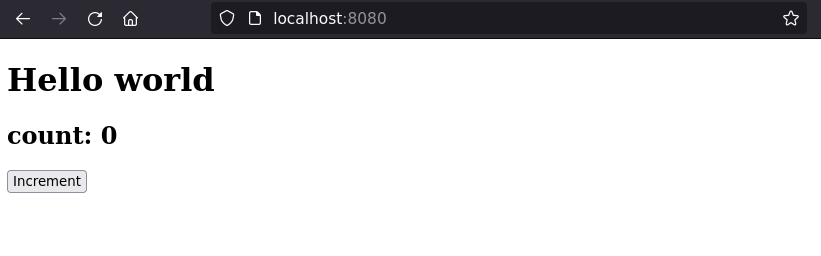
<p>If we run the code, we should see something like the following:</p>

<p><img src="/media/htmx-1/counter-1.png" alt="" /></p>

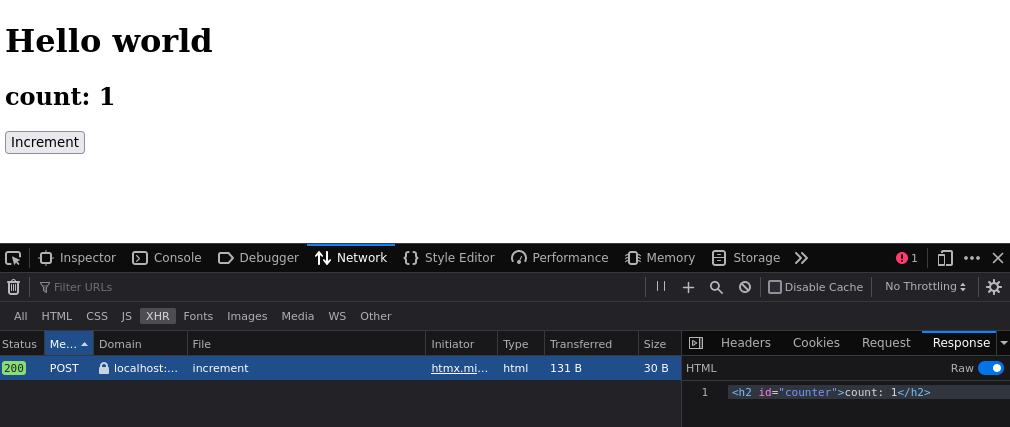
<p>Now press ‘increment’ and see what happens!</p>

<p>(Spoilers: the number should increment!)</p>

<p>If we have the network tab open, we can see the request to <code class="language-plaintext highlighter-rouge">/increment</code>, with the html being
returned.</p>

<p><img src="/media/htmx-1/counter-2.png" alt="" /></p>

<p>The counter will persist even if you refresh the page, as the number is stored on the server!</p>

<h2 id="the-end">The End?</h2>
<p>I hope you have enjoyed learning a bit about Javalin, j2html and htmx!</p>

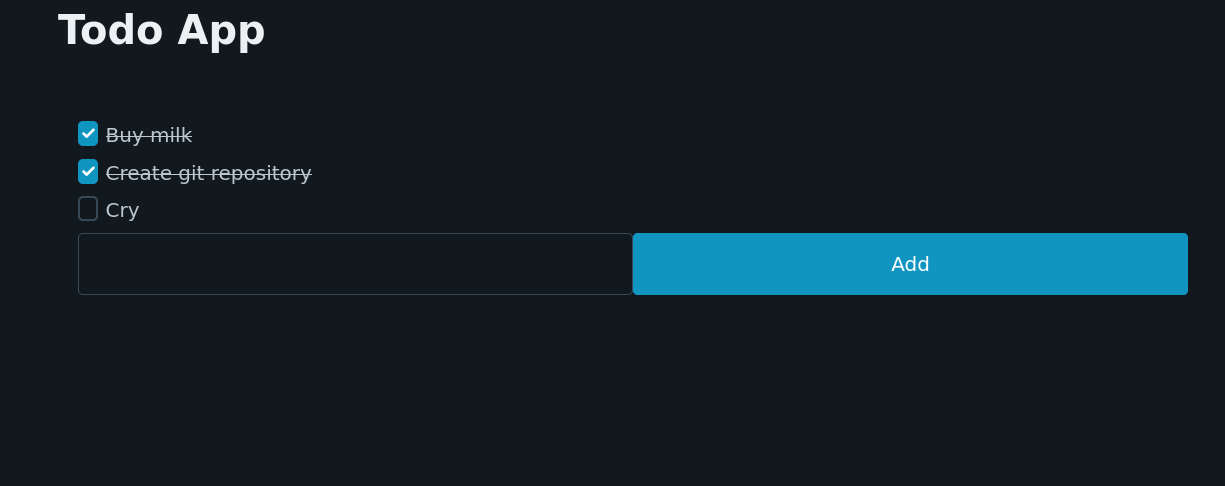
<p>If you want to see see an example of a todo app using Javalin, you can have a look at this github
repository: <a href="https://github.com/AussieGuy0/java-htmx-todo/">java-htmx-todo</a></p>

<p><img src="/media/htmx-1/todo.png" alt="" /></p>]]></content><author><name>Anthony Bruno</name></author><category term="Java" /><category term="Htmx" /><summary type="html"><![CDATA[]]></summary></entry><entry><title type="html">Migrating a classic Jekyll GitHub Pages site to GitHub actions</title><link href="https://anthonybruno.dev/2023/05/15/Migrating-default-github-pages-to-github-actions/" rel="alternate" type="text/html" title="Migrating a classic Jekyll GitHub Pages site to GitHub actions" /><published>2023-05-15T00:00:00+00:00</published><updated>2023-05-15T00:00:00+00:00</updated><id>https://anthonybruno.dev/2023/05/15/Migrating-default-github-pages-to-github-actions</id><content type="html" xml:base="https://anthonybruno.dev/2023/05/15/Migrating-default-github-pages-to-github-actions/"><![CDATA[<p>I’ve had this site (https://anthonybruno.dev/) running inside <a href="https://pages.github.com/">Github
Pages</a> for a long time now without many issues. Under the hood, it uses
a ruby-based static site generator called <a href="https://jekyllrb.com/">Jekyll</a>.</p>

<p>However, something that I have noticed is that you don’t have much control over what Jekyll and ruby
version is used. This seems to be getting a little bit out of date as time goes on. GitHub lists the
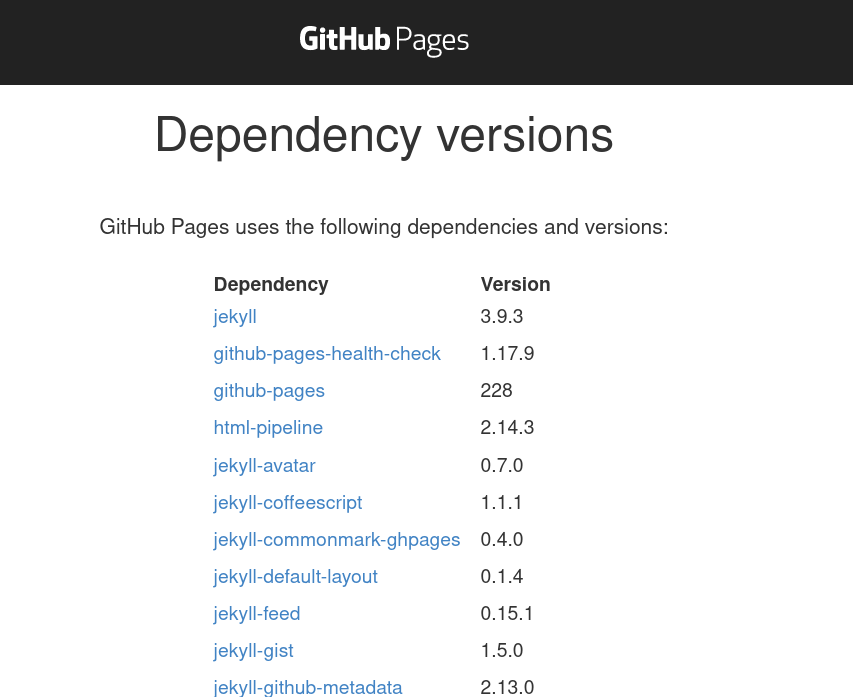
dependencies on <a href="https://pages.github.com/versions/">this page</a>. At time of writing, it uses Jekyll
3.9.3 (latest version is 4.3.2), and ruby 2.7.4 (latest version is 3.2.2).</p>

<p><img src="/media/github-actions/versions.png" alt="" /></p>

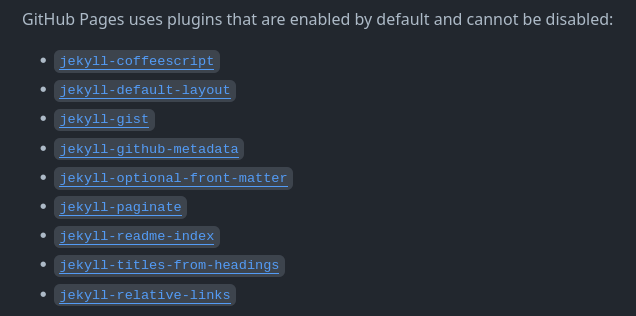
<p>Additionally, GitHub restricts what Jekyll plugins you can use and actually
enables certain plugins that can’t be disabled. For instance, it brings in <code class="language-plaintext highlighter-rouge">jekyll-coffeescript</code>…
which is used to convert coffeescript…even though my site doesn’t have any coffeescript (it’s 2023!).</p>

<p><img src="/media/github-actions/plugins.png" alt="" /></p>

<p>For these reasons, I looked into alternatives, and I found out that you can use GitHub actions to
deploy a site!</p>

<p>I couldn’t find a nice guide on how to do this, so after working things out, I decided to write this
guide.</p>

<p>It’s pretty straightforward, we only really need to do 2 things:</p>

<ol>
  <li>Adjust the repository settings to use GitHub actions for site deployments.</li>
  <li>Add a single YAML file to define how GitHub will build and deploy the site.</li>
</ol>

<h1 id="steps">Steps</h1>

<h2 id="1-repository-settings">1. Repository Settings</h2>
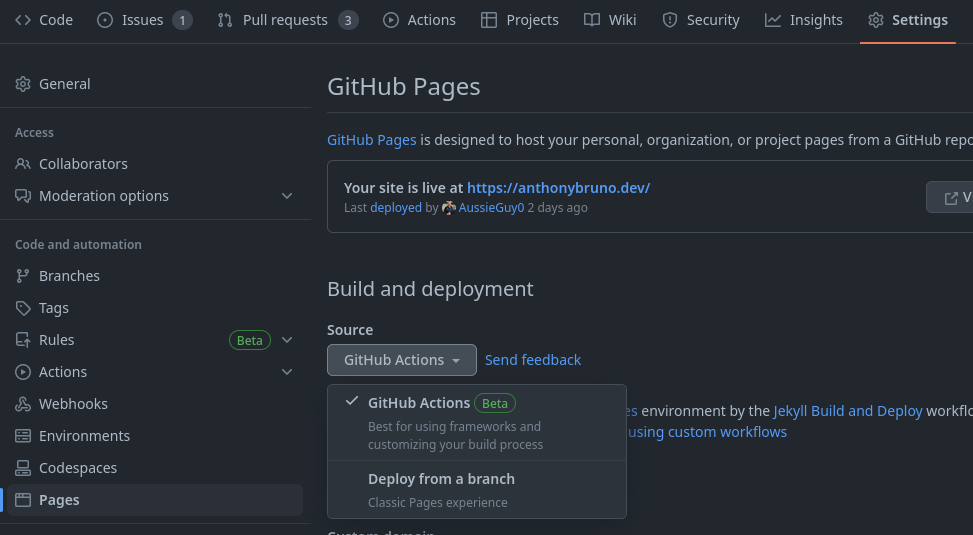
<p>Firstly, we need toggle the deployment setting from the ‘default’ GitHub pages deploy to GitHub
actions.</p>

<p>We can do this via Settings -&gt; Pages. We just need to change the ‘Source’ as shown in the screenshot
below:</p>

<p><img src="/media/github-actions/settings.png" alt="" /></p>

<p>Note that this won’t really do anything, until we do the next step!</p>

<h2 id="2-github-actions-workflow">2. GitHub Actions Workflow</h2>
<p>The workflow is how we tell GitHub how to build and deploy the site. You can read a bit more about
workflows in the <a href="https://docs.github.com/en/actions/using-workflows/about-workflows">GitHub docs</a>
(there’s a bunch more cool things you can do with workflows!)</p>

<p>To start, we need to define a YAML file in the path <code class="language-plaintext highlighter-rouge">&lt;repo-root&gt;/.github/workflows/&lt;workflow-name&gt;.yml</code></p>

<p>We can call the workflow file anything. I just went with the very creative name: <code class="language-plaintext highlighter-rouge">jekyll.yml</code>.</p>

<p>The contents of the file should look something like the below. For those interested, I will explain
it further down below.</p>

<div class="language-yaml highlighter-rouge"><div class="highlight"><pre class="highlight"><code><span class="na">name</span><span class="pi">:</span> <span class="s">Jekyll Build and Deploy</span>

<span class="na">on</span><span class="pi">:</span> <span class="pi">[</span><span class="nv">push</span><span class="pi">]</span>

<span class="na">jobs</span><span class="pi">:</span>

  <span class="na">build</span><span class="pi">:</span>
    <span class="na">runs-on</span><span class="pi">:</span> <span class="s">ubuntu-latest</span>
    <span class="na">steps</span><span class="pi">:</span>
      <span class="pi">-</span> <span class="na">uses</span><span class="pi">:</span> <span class="s">actions/checkout@v3</span>
      <span class="pi">-</span> <span class="na">uses</span><span class="pi">:</span> <span class="s">ruby/setup-ruby@v1</span>
        <span class="na">with</span><span class="pi">:</span>
          <span class="na">ruby-version</span><span class="pi">:</span> <span class="s1">'</span><span class="s">2.7.4'</span>
          <span class="na">bundler-cache</span><span class="pi">:</span> <span class="kc">true</span> <span class="c1"># runs 'bundle install' and caches installed gems automatically</span>
      <span class="pi">-</span> <span class="na">run</span><span class="pi">:</span> <span class="s">bundle exec jekyll build</span>
      <span class="pi">-</span> <span class="na">uses</span><span class="pi">:</span> <span class="s">actions/upload-pages-artifact@v1</span>
        <span class="na">with</span><span class="pi">:</span>
          <span class="na">path</span><span class="pi">:</span> <span class="s2">"</span><span class="s">_site/"</span>

  <span class="na">deploy</span><span class="pi">:</span>
    <span class="c1"># Add a dependency to the build job</span>
    <span class="na">needs</span><span class="pi">:</span> <span class="s">build</span>
    <span class="na">if</span><span class="pi">:</span> <span class="s">github.ref == 'refs/heads/master'</span> <span class="c1"># Only deploys on master</span>

    <span class="c1"># Grant GITHUB_TOKEN the permissions required to make a Pages deployment</span>
    <span class="na">permissions</span><span class="pi">:</span>
      <span class="na">pages</span><span class="pi">:</span> <span class="s">write</span>      <span class="c1"># to deploy to Pages</span>
      <span class="na">id-token</span><span class="pi">:</span> <span class="s">write</span>   <span class="c1"># to verify the deployment originates from an appropriate source</span>

    <span class="c1"># Deploy to the github-pages environment</span>
    <span class="na">environment</span><span class="pi">:</span>
      <span class="na">name</span><span class="pi">:</span> <span class="s">github-pages</span>
      <span class="na">url</span><span class="pi">:</span> <span class="s">${{ steps.deployment.outputs.page_url }}</span>

    <span class="c1"># Specify runner + deployment step</span>
    <span class="na">runs-on</span><span class="pi">:</span> <span class="s">ubuntu-latest</span>
    <span class="na">steps</span><span class="pi">:</span>
      <span class="pi">-</span> <span class="na">name</span><span class="pi">:</span> <span class="s">Deploy to GitHub Pages</span>
        <span class="na">id</span><span class="pi">:</span> <span class="s">deployment</span>
        <span class="na">uses</span><span class="pi">:</span> <span class="s">actions/deploy-pages@v2</span>
</code></pre></div></div>

<p>Side-note: this requires a <code class="language-plaintext highlighter-rouge">Gemfile</code> to be defined in the repository root. I’m not sure if my one
was created when I first set up the GitHub pages (many years ago!), or I added it afterwards. In
case you don’t have one, here’s mine:</p>

<div class="language-plaintext highlighter-rouge"><div class="highlight"><pre class="highlight"><code>source 'https://rubygems.org'
gem 'github-pages', group: :jekyll_plugins
gem 'jekyll-seo-tag'
gem 'rouge'
gem 'jekyll-feed'
</code></pre></div></div>

<h3 id="explaining-the-workflow">Explaining the workflow</h3>

<p>I’ll break it down section by section:</p>

<div class="language-yaml highlighter-rouge"><div class="highlight"><pre class="highlight"><code><span class="na">name</span><span class="pi">:</span> <span class="s">Jekyll Build and Deploy</span>
</code></pre></div></div>

<p>The name of the workflow, which is shown in GitHub’s UI.</p>

<div class="language-yaml highlighter-rouge"><div class="highlight"><pre class="highlight"><code><span class="na">on</span><span class="pi">:</span> <span class="pi">[</span><span class="nv">push</span><span class="pi">]</span>
</code></pre></div></div>

<p>Indicates that the workflow will run on any push to the GitHub repository. This includes commits in
PRs.</p>

<div class="language-yaml highlighter-rouge"><div class="highlight"><pre class="highlight"><code>  <span class="na">build</span><span class="pi">:</span>
    <span class="na">runs-on</span><span class="pi">:</span> <span class="s">ubuntu-latest</span>
    <span class="na">steps</span><span class="pi">:</span>
      <span class="pi">-</span> <span class="na">uses</span><span class="pi">:</span> <span class="s">actions/checkout@v3</span>
      <span class="pi">-</span> <span class="na">uses</span><span class="pi">:</span> <span class="s">ruby/setup-ruby@v1</span>
        <span class="na">with</span><span class="pi">:</span>
          <span class="na">ruby-version</span><span class="pi">:</span> <span class="s1">'</span><span class="s">2.7.4'</span>
          <span class="na">bundler-cache</span><span class="pi">:</span> <span class="kc">true</span> <span class="c1"># runs 'bundle install' and caches installed gems automatically</span>
      <span class="pi">-</span> <span class="na">run</span><span class="pi">:</span> <span class="s">bundle exec jekyll build</span>
      <span class="pi">-</span> <span class="na">uses</span><span class="pi">:</span> <span class="s">actions/upload-pages-artifact@v1</span>
        <span class="na">with</span><span class="pi">:</span>
          <span class="na">path</span><span class="pi">:</span> <span class="s2">"</span><span class="s">_site/"</span>
</code></pre></div></div>

<p>The build job will:</p>

<ul>
  <li>Check out the repository (<code class="language-plaintext highlighter-rouge">actions/checkout@v3</code>)</li>
  <li>Set up ruby with the specified version. This step will also run <code class="language-plaintext highlighter-rouge">bundle install</code> for us!
  (<code class="language-plaintext highlighter-rouge">ruby/setup-ruby@v1</code>)</li>
  <li>Run <code class="language-plaintext highlighter-rouge">bundle exec jekyll build</code>. This runs Jekyll and produces the generated site in the folder <code class="language-plaintext highlighter-rouge">_site/</code>.</li>
  <li>Finally, uploads the generated site using <code class="language-plaintext highlighter-rouge">actions/upload-page-artifacts@1</code>, which is a requirement
  to deploy the site.</li>
</ul>

<div class="language-yaml highlighter-rouge"><div class="highlight"><pre class="highlight"><code>  <span class="na">deploy</span><span class="pi">:</span>
    <span class="c1"># Add a dependency to the build job</span>
    <span class="na">needs</span><span class="pi">:</span> <span class="s">build</span>
    <span class="na">if</span><span class="pi">:</span> <span class="s">github.ref == 'refs/heads/master'</span> <span class="c1"># Only deploys on master</span>

    <span class="c1"># Grant GITHUB_TOKEN the permissions required to make a Pages deployment</span>
    <span class="na">permissions</span><span class="pi">:</span>
      <span class="na">pages</span><span class="pi">:</span> <span class="s">write</span>      <span class="c1"># to deploy to Pages</span>
      <span class="na">id-token</span><span class="pi">:</span> <span class="s">write</span>   <span class="c1"># to verify the deployment originates from an appropriate source</span>

    <span class="c1"># Deploy to the github-pages environment</span>
    <span class="na">environment</span><span class="pi">:</span>
      <span class="na">name</span><span class="pi">:</span> <span class="s">github-pages</span>
      <span class="na">url</span><span class="pi">:</span> <span class="s">${{ steps.deployment.outputs.page_url }}</span>

    <span class="c1"># Specify runner + deployment step</span>
    <span class="na">runs-on</span><span class="pi">:</span> <span class="s">ubuntu-latest</span>
    <span class="na">steps</span><span class="pi">:</span>
      <span class="pi">-</span> <span class="na">name</span><span class="pi">:</span> <span class="s">Deploy to GitHub Pages</span>
        <span class="na">id</span><span class="pi">:</span> <span class="s">deployment</span>
        <span class="na">uses</span><span class="pi">:</span> <span class="s">actions/deploy-pages@v2</span>
</code></pre></div></div>

<p>It’s important to note that the deploy job:</p>
<ul>
  <li>Only runs after the build job is done.</li>
  <li>Will only run on <code class="language-plaintext highlighter-rouge">master</code>, which is my repository’s default branch. Newer repositories will have
  <code class="language-plaintext highlighter-rouge">main</code> as their default branch.</li>
  <li>Has suitable permissions to deploy to GitHub Pages.</li>
</ul>

<p>The only step that this job has is: <code class="language-plaintext highlighter-rouge">actions/deploy-pages@v2</code>. This deploys the site that we
uploaded in the build step with <code class="language-plaintext highlighter-rouge">actions/upload-pages-artifact@v1</code>.</p>

<h2 id="3-success">3. Success!</h2>
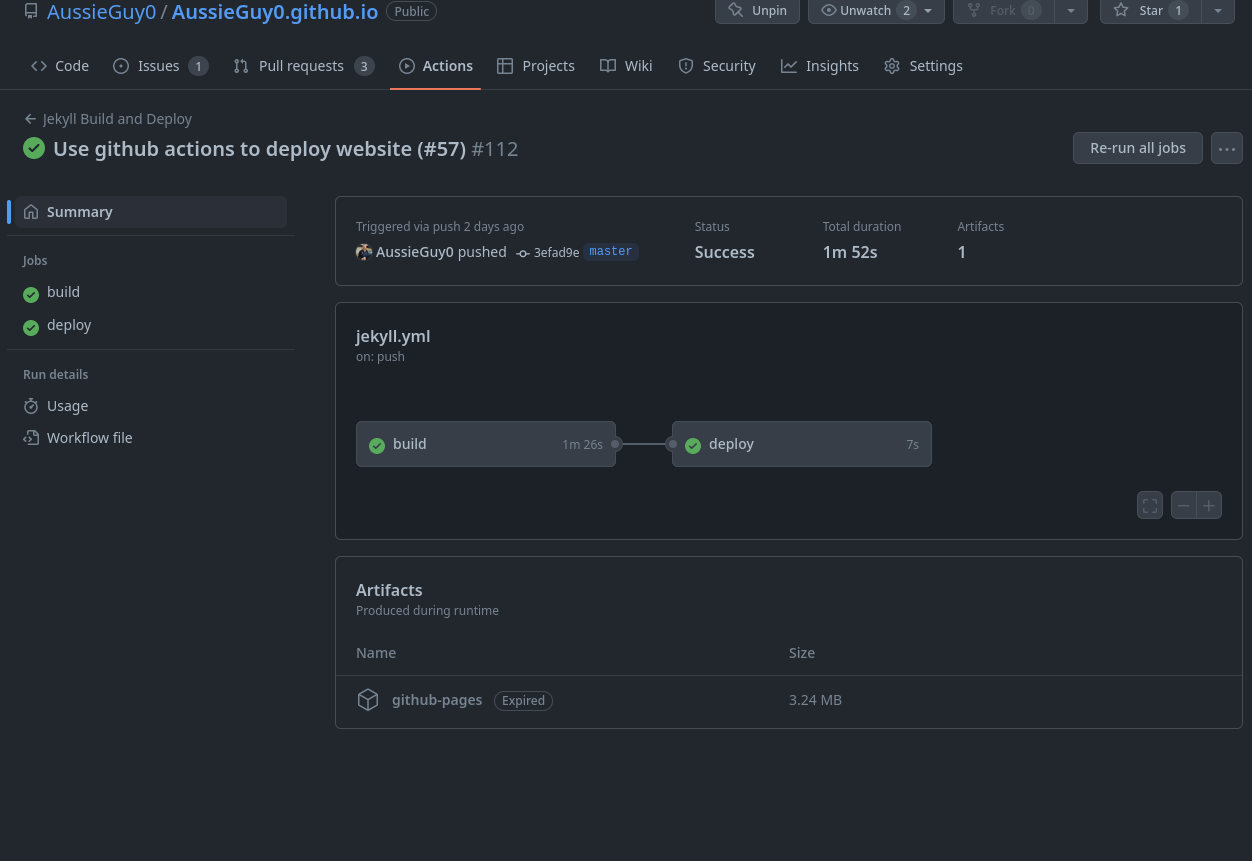
<p>When you next push to your default branch, you should see the workflow running in the actions page
of your repository.</p>

<p>Here is an example of mine:</p>

<p><img src="/media/github-actions/success.png" alt="" /></p>

<p>And the fact that you can read this page, means that the workflow is deploying the site. Yay!</p>

<p>Now, you can run any version of ruby and Jekyll you want, use any plugin you want, and I can finally
get rid of that weird coffeescript plugin. Double yay!</p>

<p>For reference, please take a look at <a href="https://github.com/AussieGuy0/AussieGuy0.github.io/pull/57">my
PR</a>, which converted this site to use
Github Actions.</p>]]></content><author><name>Anthony Bruno</name></author><category term="Github" /><category term="Guide" /><summary type="html"><![CDATA[I’ve had this site (https://anthonybruno.dev/) running inside Github Pages for a long time now without many issues. Under the hood, it uses a ruby-based static site generator called Jekyll.]]></summary></entry><entry><title type="html">Common Java patterns in Kotlin</title><link href="https://anthonybruno.dev/2020/08/09/Common-Java-Patterns-In-Kotlin/" rel="alternate" type="text/html" title="Common Java patterns in Kotlin" /><published>2020-08-09T00:00:00+00:00</published><updated>2020-08-09T00:00:00+00:00</updated><id>https://anthonybruno.dev/2020/08/09/Common-Java-Patterns-In-Kotlin</id><content type="html" xml:base="https://anthonybruno.dev/2020/08/09/Common-Java-Patterns-In-Kotlin/"><![CDATA[<p><img src="/media/kotlin-to-java.png" alt="Java logo with an arrow pointing to the Kotlin logo" /></p>

<p>Recently, I’ve been using Kotlin for a project at work. As someone coming from a 
Java background, I’ve been taking notes on certain patterns that are used in
Java, that can be done nicer in Kotlin. I feel like when using a new
language, it’s easy to fall into the trap of writing non-idiomatic code simply
because it’s what I would’ve done in another language.</p>

<p>I wrote this article with the idea that this is what I would’ve wanted when starting
with Kotlin, and I plan on updating it as I learn more techniques. Anyway, let’s
begin!</p>

<h2 id="multi-line-strings">Multi-line Strings</h2>
<p>Sometimes, it is nice to embed SQL or have HTML snippets in our
application. In these cases, we want to be able to have a <code class="language-plaintext highlighter-rouge">String</code> that spans
multiple lines. If we had it on a single line, it would be near impossible to
read!</p>

<h3 id="java">Java</h3>
<p>In Java 11 and below, we have to resort to simple <code class="language-plaintext highlighter-rouge">String</code> <code class="language-plaintext highlighter-rouge">+</code> concatenation. Make sure you don’t forget
to add new line endings <code class="language-plaintext highlighter-rouge">\n</code> or else when the String is built, it will all end up
on one line!</p>
<div class="language-java highlighter-rouge"><div class="highlight"><pre class="highlight"><code><span class="c1">// Java 11 and older</span>
<span class="nc">String</span> <span class="n">query</span> <span class="o">=</span> <span class="s">"SELECT w.id, w.title, w.date, we.weight, e.name\n"</span> <span class="o">+</span>
        <span class="s">"FROM workouts as w\n"</span> <span class="o">+</span>
        <span class="s">"LEFT JOIN workout_exercises as we ON w.id = we.workout_id\n"</span> <span class="o">+</span>
        <span class="s">"LEFT JOIN exercises as e on we.exercise_id = e.id\n"</span> <span class="o">+</span>
        <span class="s">"WHERE w.user_id = ?"</span><span class="o">;</span>
</code></pre></div></div>

<p>However, starting from Java 13, we have a much nicer way of writing this!</p>

<div class="language-java highlighter-rouge"><div class="highlight"><pre class="highlight"><code><span class="c1">// Java 13 and above</span>
<span class="nc">String</span> <span class="n">query</span> <span class="o">=</span> <span class="sh">"""
        SELECT w.id, w.title, w.date, we.weight, e.name
        FROM workouts as w
        LEFT JOIN workout_exercises as we ON w.id = we.workout_id
        LEFT JOIN exercises as e on we.exercise_id = e.id
        WHERE w.user_id = ?
        """</span><span class="o">;</span>
</code></pre></div></div>

<p>This is an example of a <a href="https://openjdk.java.net/jeps/378">Text Block</a>, which is a preview 
feature in Java 13 and 14. At the time of writing, this feature will be finalised in Java 15.</p>

<h3 id="kotlin">Kotlin</h3>
<p>For Kotlin, the syntax is similar to what is available in Java 13+.</p>

<div class="language-kotlin highlighter-rouge"><div class="highlight"><pre class="highlight"><code><span class="kd">val</span> <span class="py">query</span> <span class="p">=</span> <span class="s">"""
    SELECT w.id, w.title, w.date, we.weight, e.name
    FROM workouts as w
    LEFT JOIN workout_exercises as we ON w.id = we.workout_id
    LEFT JOIN exercises as e on we.exercise_id = e.id
    WHERE w.user_id = ?
"""</span><span class="p">.</span><span class="nf">trimIndent</span><span class="p">()</span>
</code></pre></div></div>

<p>You might be asking why we have to call the <code class="language-plaintext highlighter-rouge">trimIndent</code> function at the end.
This is because if we don’t, Kotlin will construct the <code class="language-plaintext highlighter-rouge">String</code> including the
initial whitespace indentation on each line. As we are only inserting that
indentation for readability purposes, we have to call <code class="language-plaintext highlighter-rouge">trimIndent</code> which will
remove this initial whitespace from each line.</p>

<p>I think this is a case where the Java way of Text Blocks is a bit better, as it
will automatically trim the whitespace for us. However, Kotlin is <strong>here now</strong> and 
(at the time of writing) Java 15 is still a month or so away!</p>

<h2 id="string-concatenation">String Concatenation</h2>
<p>Another common thing we like to do with <code class="language-plaintext highlighter-rouge">String</code>s is to construct them with
variables. For instance, we receive some input from the user and we want to
create a message based on that input.</p>

<h3 id="java-1">Java</h3>
<p>Unfortunately, Java does not have a nice, modern way to do this and we have to 
resort to simply using <code class="language-plaintext highlighter-rouge">+</code> to build our String.</p>

<div class="language-java highlighter-rouge"><div class="highlight"><pre class="highlight"><code><span class="nc">String</span> <span class="n">name</span> <span class="o">=</span> <span class="s">"bob"</span><span class="o">;</span>
<span class="kt">int</span> <span class="n">age</span> <span class="o">=</span> <span class="mi">18</span><span class="o">;</span>
<span class="nc">String</span> <span class="n">message</span> <span class="o">=</span> <span class="s">"My name is "</span> <span class="o">+</span> <span class="n">name</span> <span class="o">+</span> <span class="s">" and my age is"</span> <span class="o">+</span> <span class="n">age</span><span class="o">;</span>
</code></pre></div></div>

<p>We do have other options that are useful in certain situations, such as
<a href="https://docs.oracle.com/en/java/javase/11/docs/api/java.base/java/lang/StringBuilder.html">StringBuilder</a>
and
<a href="https://docs.oracle.com/en/java/javase/11/docs/api/java.base/java/lang/String.html#format(java.lang.String,java.lang.Object...)">String#format</a>. But for simple, straight forward
situations, we can only use <code class="language-plaintext highlighter-rouge">+</code>.</p>

<h3 id="kotlin-1">Kotlin</h3>
<p>In Kotlin, we can use template expressions inside a <code class="language-plaintext highlighter-rouge">String</code>. This greatly improves
readability when a <code class="language-plaintext highlighter-rouge">String</code> is concatenated with multiple values.</p>
<div class="language-kotlin highlighter-rouge"><div class="highlight"><pre class="highlight"><code><span class="kd">val</span> <span class="py">name</span> <span class="p">=</span> <span class="s">"bob"</span><span class="p">;</span>
<span class="kd">val</span> <span class="py">age</span> <span class="p">=</span> <span class="mi">18</span><span class="p">;</span>
<span class="kd">val</span> <span class="py">message</span> <span class="p">=</span> <span class="s">"My name is $name and my age is $age"</span>

<span class="c1">// Can also use ${expression} for more complex usages</span>
<span class="kd">val</span> <span class="py">message</span> <span class="p">=</span> <span class="s">"My name is $name and my age in 10 years will be ${age + 10}"</span>

</code></pre></div></div>

<h2 id="static-utility-methods">Static Utility Methods</h2>
<p>When we want utility methods that we want to use without having create a new Object, 
it is common practice to add them as static methods on a class.</p>

<p>Frequently, ‘Util’ classes exist that only contain static methods. This is a
pattern employed by popular libraries like <a href="https://github.com/google/guava">Google
Guava</a> and <a href="https://github.com/apache/commons-lang">Apache
Commons</a>.</p>

<h3 id="java-2">Java</h3>
<div class="language-java highlighter-rouge"><div class="highlight"><pre class="highlight"><code><span class="kd">public</span> <span class="kd">class</span> <span class="nc">StringUtils</span> <span class="o">{</span>

    <span class="kd">public</span> <span class="kd">static</span> <span class="kt">char</span> <span class="nf">getLastLetter</span><span class="o">(</span><span class="nc">String</span> <span class="n">str</span><span class="o">)</span> <span class="o">{</span>
        <span class="k">if</span> <span class="o">(</span><span class="n">str</span><span class="o">.</span><span class="na">isEmpty</span><span class="o">())</span> <span class="o">{</span>
            <span class="k">throw</span> <span class="k">new</span> <span class="nf">IllegalArgumentException</span><span class="o">(</span><span class="s">"Provided string must not be empty"</span><span class="o">);</span>
        <span class="o">}</span>
        <span class="k">return</span> <span class="n">str</span><span class="o">.</span><span class="na">charAt</span><span class="o">(</span><span class="n">str</span><span class="o">.</span><span class="na">length</span><span class="o">()</span> <span class="o">-</span> <span class="mi">1</span><span class="o">);</span>
    <span class="o">}</span>

<span class="o">}</span>

<span class="nc">StringUtils</span><span class="o">.</span><span class="na">getLastLetter</span><span class="o">(</span><span class="s">"abc"</span><span class="o">)</span> <span class="c1">// =&gt; c</span>
</code></pre></div></div>

<h3 id="kotlin-2">Kotlin</h3>

<p>In Kotlin, we have a few options.</p>

<p>Firstly, we can have a top-level function. That is, a function that is not
attached to a class.  This language feature does not exist in Java.</p>

<p>We can call the function from anywhere we want, without needing to create a new
object, or prefix a class name in front of the function call.</p>

<div class="language-kotlin highlighter-rouge"><div class="highlight"><pre class="highlight"><code><span class="c1">// Using a top-level function</span>

<span class="k">fun</span> <span class="nf">getLastLetter</span><span class="p">(</span><span class="n">str</span><span class="p">:</span> <span class="nc">String</span><span class="p">):</span> <span class="nc">Char</span> <span class="p">{</span>
    <span class="k">if</span> <span class="p">(</span><span class="n">str</span><span class="p">.</span><span class="nf">isEmpty</span><span class="p">())</span> <span class="p">{</span>
        <span class="k">throw</span> <span class="nc">IllegalArgumentException</span><span class="p">(</span><span class="s">"Provided string must not be empty"</span><span class="p">)</span>
    <span class="p">}</span>
    <span class="k">return</span> <span class="n">str</span><span class="p">[</span><span class="n">str</span><span class="p">.</span><span class="n">length</span> <span class="p">-</span> <span class="mi">1</span><span class="p">]</span>
<span class="p">}</span>

<span class="nf">getLastLetter</span><span class="p">(</span><span class="s">"abc"</span><span class="p">)</span> <span class="c1">// =&gt; c</span>
</code></pre></div></div>

<p>Next, we can add a method to an <code class="language-plaintext highlighter-rouge">object</code>. This is roughly equivalent to the static
method way we saw in Java, and the calling code is the same.</p>

<div class="language-kotlin highlighter-rouge"><div class="highlight"><pre class="highlight"><code><span class="c1">// Using an Object</span>
<span class="c1">// https://kotlinlang.org/docs/tutorials/kotlin-for-py/objects-and-companion-objects.html</span>
<span class="kd">object</span> <span class="nc">StringUtils</span> <span class="p">{</span>

    <span class="k">fun</span> <span class="nf">getLastLetter</span><span class="p">(</span><span class="n">str</span><span class="p">:</span> <span class="nc">String</span><span class="p">):</span> <span class="nc">Char</span> <span class="p">{</span>
        <span class="k">if</span> <span class="p">(</span><span class="n">str</span><span class="p">.</span><span class="nf">isEmpty</span><span class="p">())</span> <span class="p">{</span>
            <span class="k">throw</span> <span class="nc">IllegalArgumentException</span><span class="p">(</span><span class="s">"Provided string must not be empty"</span><span class="p">)</span>
        <span class="p">}</span>
        <span class="k">return</span> <span class="n">str</span><span class="p">[</span><span class="n">str</span><span class="p">.</span><span class="n">length</span> <span class="p">-</span> <span class="mi">1</span><span class="p">]</span>
    <span class="p">}</span>

<span class="p">}</span>
<span class="nc">StringUtils</span><span class="p">.</span><span class="nf">getLastLetter</span><span class="p">(</span><span class="s">"abc"</span><span class="p">)</span>  <span class="c1">// =&gt; c</span>
</code></pre></div></div>

<p>Finally, we have an extension function. This is a cool feature that allows us to
attach a method to an existing class, without the need of creating a subclass or
a new wrapped type!</p>

<div class="language-kotlin highlighter-rouge"><div class="highlight"><pre class="highlight"><code><span class="c1">// Using an extension function</span>
<span class="c1">// https://kotlinlang.org/docs/reference/extensions.html</span>
<span class="c1">// Preferred!</span>
<span class="k">fun</span> <span class="nc">String</span><span class="p">.</span><span class="nf">getLastLetter</span><span class="p">():</span> <span class="nc">Char</span> <span class="p">{</span>
    <span class="k">if</span> <span class="p">(</span><span class="k">this</span><span class="p">.</span><span class="nf">isEmpty</span><span class="p">())</span> <span class="p">{</span>
        <span class="k">throw</span> <span class="nc">IllegalArgumentException</span><span class="p">(</span><span class="s">"Provided string must not be empty"</span><span class="p">)</span>
    <span class="p">}</span>
    <span class="k">return</span> <span class="k">this</span><span class="p">[</span><span class="k">this</span><span class="p">.</span><span class="n">length</span> <span class="p">-</span> <span class="mi">1</span><span class="p">]</span>
<span class="p">}</span>

<span class="s">"abc"</span><span class="p">.</span><span class="nf">getLastLetter</span><span class="p">()</span> <span class="c1">// =&gt; c</span>
</code></pre></div></div>

<p>This extension function feature was one the initial features I saw when
looking at Kotiln where I thought that it was really useful!</p>

<h2 id="singletons">Singletons</h2>
<p>In some cases, we want to be able to define and use
<a href="https://en.wikipedia.org/wiki/Singleton_pattern">singleton’s</a> in our code.</p>

<h3 id="java-3">Java</h3>
<p>With Java, we can do this by creating a class with a private constructor. The class
then provides a public static field that can be accessed from calling code.</p>

<div class="language-java highlighter-rouge"><div class="highlight"><pre class="highlight"><code><span class="kd">public</span> <span class="kd">class</span> <span class="nc">BeanFactory</span> <span class="o">{</span>

    <span class="kd">public</span> <span class="kd">static</span> <span class="kd">final</span> <span class="nc">BeanFactory</span> <span class="no">INSTANCE</span> <span class="o">=</span> <span class="k">new</span> <span class="nc">BeanFactory</span><span class="o">();</span>

    <span class="kd">private</span> <span class="nf">BeanFactory</span><span class="o">()</span> <span class="o">{</span>
        <span class="c1">// Prevent outside world creating a new BeanFactory</span>
    <span class="o">}</span>

    <span class="kd">public</span> <span class="nc">Beans</span> <span class="nf">createBakedBeans</span><span class="o">()</span> <span class="o">{</span>
        <span class="k">return</span> <span class="k">new</span> <span class="nf">BakedBeans</span><span class="o">();</span>
    <span class="o">}</span>
<span class="o">}</span>
</code></pre></div></div>

<h3 id="kotlin-3">Kotlin</h3>
<p>In Kotlin, we greatly reduce boilerplate code by simply defining a new <code class="language-plaintext highlighter-rouge">object</code>
type.</p>

<div class="language-kotlin highlighter-rouge"><div class="highlight"><pre class="highlight"><code><span class="kd">object</span> <span class="nc">BeanFactory</span> <span class="p">{</span>

    <span class="k">fun</span> <span class="nf">createBakedBeans</span><span class="p">():</span> <span class="nc">Beans</span> <span class="p">{</span>
        <span class="k">return</span> <span class="nc">BakedBeans</span><span class="p">()</span>
    <span class="p">}</span>

<span class="p">}</span>
</code></pre></div></div>

<p>For more information about <code class="language-plaintext highlighter-rouge">object</code>, please read <a href="https://kotlinlang.org/docs/reference/object-declarations.html">the relevant
docs</a>.</p>

<h2 id="conclusion">Conclusion</h2>
<p>I’ve covered how to write common Java techniques in idiomatic Kotlin. Often, the
equivalent Kotlin code is shorter and more readable.</p>

<p>My advice for Java developers starting with Kotlin: <strong>always be learning!</strong> If you find
yourself encountering a new problem in Kotlin and you solve it by writing
Java-ish code, slow down and see if there’s a better way to do it in Kotlin.
Have a search on Google or talk to your favourite coworker about it.
This way, you will continuously learn best practices while still being
productive!</p>]]></content><author><name>Anthony Bruno</name></author><category term="Java" /><category term="Kotlin" /><summary type="html"><![CDATA[]]></summary></entry><entry><title type="html">My time at DDDAdelaide 2019</title><link href="https://anthonybruno.dev/2020/01/09/DDDAdelaide-2019/" rel="alternate" type="text/html" title="My time at DDDAdelaide 2019" /><published>2020-01-09T00:00:00+00:00</published><updated>2020-01-09T00:00:00+00:00</updated><id>https://anthonybruno.dev/2020/01/09/DDDAdelaide-2019</id><content type="html" xml:base="https://anthonybruno.dev/2020/01/09/DDDAdelaide-2019/"><![CDATA[<p><a href="https://dddadelaide.com"><img src="/media/DDDAdelaideLogo.png" alt="DDD Logo" /></a></p>

<p>Recently (yes, I say recently even though it happened last year!) I attended the very first edition of DDDAdelaide. It’s awesome finally
seeing Adelaide getting a software development conference. It was really well
put together, and I had a great time. I would highly recommend anyone going
to the next one!</p>

<p>This article covers my key takeaways from some of the talks I saw. I’ve also
included each presenter’s Twitter and a link to the slides where possible.</p>

<h2 id="shifting-left-devsecops-as-an-approach-to-building-secure-products">Shifting Left: DevSecOps as an Approach to Building Secure Products</h2>
<p><a href="https://twitter.com/JakobTheDev">Jakob Pennington</a></p>

<p>Fantastic talk about moving security testing from near/after the release stage,
to the development stage. As a programmer by trade, I know security is
important but it sometimes feels like it is left  behind a bit in the engineering process. The suggestion to
add security testing as part of automated CI/CD is definitely something I want to
explore doing.</p>

<ul>
  <li>Recommendation to have a separate environment for security testing</li>
  <li>Security tools: Burp Suite (expensive!), Owasp Zap (free!)</li>
  <li>Tools to help manage dependencies: Snyk, Dependabot</li>
  <li>‘Sans Appsec’ as a resource for application security</li>
  <li>Guidelines: Security shouldn’t get in devs way and track security defects tracked as tickets</li>
</ul>

<h2 id="graphql-grpc-or-rest-resolving-the-api-developers-dilemma">GraphQL, gRPC or REST? Resolving the API Developer’s Dilemma</h2>
<p><a href="https://twitter.com/robcrowley">Rob Crowley</a> - <a href="https://speakerdeck.com/robcrowley/graphql-grpc-or-rest-resolving-the-api-developers-dilemma">Slides</a></p>

<p>Rob initially goes into the history of API technology, with some funny commentary on how
we think the newest thing that comes out is the ‘best’ (<em>‘SOAP is dead, long live
REST’</em> to <em>‘REST is dead long live GraphQL’</em>)</p>

<ul>
  <li>REST is generally a good choice for starting an API</li>
  <li>GraphQL is not the best choice for server to server communication</li>
  <li>There exists some challenges regarding caching with GraphQL</li>
  <li>The speed of a GraphQL response is limited by the slowest field</li>
  <li><em>GraphQL eliminates the need for versioning</em> - we didn’t need versioning in
other API types either!
    <ul>
      <li>We should strive for ‘Graceful Evolution’. (e.g. Don’t add required
  inputs/don’t remove outputs/don’t change type of field/follow Robustness
  Principle)</li>
    </ul>
  </li>
  <li>Deprecations are still hard, even with GraphQL</li>
  <li>Integration Pattern - Martin Fowler</li>
  <li>Recommendations:
    <ul>
      <li>REST: Most of your API is CRUD</li>
      <li>GraphQL: Excels with multiple clients with Heterogeneous data requirements</li>
      <li>GRPC: Good for synchronous comms between microservices</li>
    </ul>
  </li>
  <li>Need to look into GRPC more!</li>
</ul>

<p><strong>Main takeaway:</strong> There is no universal best API style, but there is always a best
API style for you problem.</p>

<h2 id="modern-authentication-101">Modern Authentication 101</h2>
<p><a href="https://dasith.me/">Dasith Wijesiriwardena</a> - <a href="https://www.slideshare.net/DasithWijesiriwarden/ddd-melbourne-2019-modern-authentication-101-161977250">Slides</a></p>

<p>A nice overview of how to handle authentication. Dasith provided an in-depth
description on the problems with the classic model of authentication, and
described modern alternatives.</p>

<ul>
  <li>Really nice flow chart on what OAuth flow you should use, depending on the
device, what type of app it is, etc.</li>
  <li>Can see myself going back to the slides for reference!</li>
</ul>

<h2 id="typescript-beyond-101">TypeScript: Beyond 101</h2>
<p><a href="https://twitter.com/jaimefebres">Jaime Febres</a> - <a href="https://github.com/emiaj/AdvancedTypescript-Adelaide">Source Code</a></p>

<p>As a Java guy, TypeScript is something that really resonates with me. I’m
always eager to hear more about it!</p>

<p>Jaime showed some cool things that are achievable in TypeScript. The <code class="language-plaintext highlighter-rouge">keyof</code>
feature was something that found immediate use for me for a project I have at
home.</p>

<p>The speaker also had a good sense of humor, with a couple of digs at
JavaScript’s ‘type’ system.</p>

<h2 id="making-react-apps-accessible-its-easier-than-you-think">Making React Apps Accessible: It’s easier than you think</h2>
<p><a href="https://twitter.com/jessbudd4">Jess Bud</a> - <a href="https://noti.st/jessbudd/UUp8f2">Slides</a></p>

<p>Like security, I feel like accessibility is one of those things that are an after
thought in web dev. Jess brings some stats to show that things
shouldn’t be that way!</p>

<p>What I like about this talk, is while there was a focus on React, the techniques
shown can be applied to any front end framework. Also, I’ll always love a web
dev talk that promotes the use of semantic HTML!</p>]]></content><author><name>Anthony Bruno</name></author><summary type="html"><![CDATA[]]></summary></entry><entry><title type="html">Add RSS to GitHub Pages and link it to Dev.to</title><link href="https://anthonybruno.dev/2019/10/20/Add-RSS-to-Github-Pages-site-and-link-it-to-Dev.to/" rel="alternate" type="text/html" title="Add RSS to GitHub Pages and link it to Dev.to" /><published>2019-10-20T00:00:00+00:00</published><updated>2019-10-20T00:00:00+00:00</updated><id>https://anthonybruno.dev/2019/10/20/Add-RSS-to-Github-Pages-site-and-link-it-to-Dev.to</id><content type="html" xml:base="https://anthonybruno.dev/2019/10/20/Add-RSS-to-Github-Pages-site-and-link-it-to-Dev.to/"><![CDATA[<p>I’ve been posting to <a href="https://dev.to">Dev.to</a> for a little while now. I’ve always posted
to my website first, then more or less copy and pasted the markdown into the
Dev.to editor. I thought there must be a better way, and luckily stumbled upon a
setting that allows you to automatically link blog posts from GitHub Pages (or
any RSS feed) to Dev.to!</p>

<p>We’ll go through the steps of enabling RSS on a GitHub pages site, and then
we’ll link it up to a Dev.to blog.</p>

<h1 id="adding-rss-to-github-pages">Adding RSS To GitHub Pages</h1>
<p>Adding RSS support to a GitHub Pages is very simple. All we have to do is add
the following line to the <code class="language-plaintext highlighter-rouge">_config.yml</code> file in the root directory of the project.</p>

<div class="language-yaml highlighter-rouge"><div class="highlight"><pre class="highlight"><code><span class="na">plugins</span><span class="pi">:</span>
  <span class="pi">-</span> <span class="s">jekyll-feed</span>
</code></pre></div></div>

<p>To test locally, we can add the following entry to the project’s
<code class="language-plaintext highlighter-rouge">Gemfile</code>. (If you haven’t yet set up a local environment for your GitHub pages
site, please follow <a href="https://help.github.com/en/articles/testing-your-github-pages-site-locally-with-jekyll">this
guide.</a>)</p>

<div class="language-ruby highlighter-rouge"><div class="highlight"><pre class="highlight"><code><span class="n">gem</span> <span class="s1">'jekyll-feed'</span>
</code></pre></div></div>

<p>We can do a <code class="language-plaintext highlighter-rouge">bundle install</code>, which will install the required gem.</p>

<p>When we run the site using <code class="language-plaintext highlighter-rouge">bundle exec jekyll serve</code>, go to the page
<code class="language-plaintext highlighter-rouge">localhost:4000/feed.xml</code>. You should see something like this:</p>

<div class="language-xml highlighter-rouge"><div class="highlight"><pre class="highlight"><code><span class="nt">&lt;feed&gt;</span>
    <span class="nt">&lt;generator</span> <span class="na">uri=</span><span class="s">"https://jekyllrb.com/"</span> <span class="na">version=</span><span class="s">"3.8.5"</span><span class="nt">&gt;</span>Jekyll<span class="nt">&lt;/generator&gt;</span>
    <span class="nt">&lt;link</span> <span class="na">href=</span><span class="s">"https://yoursite.com/feed.xml"</span> <span class="na">rel=</span><span class="s">"self"</span> <span class="na">type=</span><span class="s">"application/atom+xml"</span><span class="nt">/&gt;</span>
    <span class="nt">&lt;link</span> <span class="na">href=</span><span class="s">"https://yoursite.com/"</span> <span class="na">rel=</span><span class="s">"alternate"</span> <span class="na">type=</span><span class="s">"text/html"</span><span class="nt">/&gt;</span>```
    <span class="c">&lt;!-- Full xml omitted --&gt;</span>
</code></pre></div></div>

<p>Side note: Technically, this is an <a href="https://en.wikipedia.org/wiki/Atom_(Web_standard)">Atom feed</a> 
but this will work fine for our use case.</p>

<p>Once we have confirmed it works, we can push it to GitHub via the following
command:
<code class="language-plaintext highlighter-rouge">git commit -am "Add jekyll-feed gem"; git push</code></p>

<h1 id="linking-rss-on-devto">Linking RSS on Dev.to</h1>
<p>Firstly, we need to go to
<a href="https://dev.to/settings/publishing-from-rss">https://dev.to/settings/publishing-from-rss</a>.</p>

<p>We then just have to paste in ‘https://yoursite.com/feed.xml’ into the box, and
press ‘update’.</p>

<p><img src="/media/DevToRss.png" alt="RSS Setting page on Dev.to" /></p>

<p>I did enable the ‘Mark the RSS source as canonical URL by default’. This means
it will mark my blog posts on my website as the original source, which helps my
website appear in Google.</p>

<p>After a small wait, posts from GitHub pages should appear in the Dashboard. They
initially come in as drafts and posts can be published individually.</p>

<h2 id="possible-improvements">Possible Improvements</h2>

<p>While the RSS integration works really well, there’s a couple of small issues I
encountered.</p>

<p>When I initially set up RSS on the Dev.to side, it said it fetched my feed but I didn’t 
see any entries in my dashboard. It wasn’t until I checked a bit later that posts were 
sent across from my blog. I certainly don’t have a problem with waiting, 
but I thought I did something wrong as there was no clear messaging that it
takes a little while.</p>

<p>Another thing is that I have some entries from my blog that I don’t want to publish on Dev.to.
However, if I delete the entries from my dashboard, they just come right back.
It’d be good if there was some way to ‘ignore’ a blog post from an RSS feed.</p>

<h1 id="conclusion">Conclusion</h1>

<p>To reiterate the steps:</p>
<ol>
  <li>Add the <code class="language-plaintext highlighter-rouge">- jekyll-feed</code> to the plugins section in <code class="language-plaintext highlighter-rouge">_config.yml</code></li>
  <li>Go to https://dev.to/settings/publishing-from-rss</li>
  <li>Enter https://yoursite/feed.xml as the RSS Feed URL</li>
  <li>Press update.</li>
  <li>Check your Dashboard to see your posts! (may take a little while)</li>
</ol>]]></content><author><name>Anthony Bruno</name></author><category term="Guide" /><summary type="html"><![CDATA[I’ve been posting to Dev.to for a little while now. I’ve always posted to my website first, then more or less copy and pasted the markdown into the Dev.to editor. I thought there must be a better way, and luckily stumbled upon a setting that allows you to automatically link blog posts from GitHub Pages (or any RSS feed) to Dev.to!]]></summary></entry><entry><title type="html">A quick look at Java 11’s HttpClient</title><link href="https://anthonybruno.dev/2019/01/16/A-quick-look-at-java-11's-HttpClient/" rel="alternate" type="text/html" title="A quick look at Java 11’s HttpClient" /><published>2019-01-16T00:00:00+00:00</published><updated>2019-01-16T00:00:00+00:00</updated><id>https://anthonybruno.dev/2019/01/16/A-quick-look-at-java-11&apos;s-HttpClient</id><content type="html" xml:base="https://anthonybruno.dev/2019/01/16/A-quick-look-at-java-11&apos;s-HttpClient/"><![CDATA[<p>Java 11 was released in September 2018 and is the first Long-Term-Support version 
after Java 8. One of its features is <a href="https://docs.oracle.com/en/java/javase/11/docs/api/java.net.http/java/net/http/HttpClient.html">HttpClient</a>, 
a new way to make HTTP requests. This post will give a quick overview of  HttpClient, and how it’s a much-needed replacement 
for <a href="https://docs.oracle.com/javase/8/docs/api/java/net/URLConnection.html">URLConnection</a>!</p>

<h2 id="the-task">The task</h2>
<p>I’ve created a page on my website <a href="http://anthonybruno.dev/last-update">http://anthonybruno.dev/last-update</a>  that
simply has a Unix timestamp of the last time the site was built.</p>

<p>The task is simple, create some code that requests this page and returns the
timestamp!</p>

<h2 id="using-urlconnection">Using URLConnection</h2>
<p>Below is the code that uses <code class="language-plaintext highlighter-rouge">URLConnection</code>.</p>
<div class="language-java highlighter-rouge"><div class="highlight"><pre class="highlight"><code><span class="c1">// 1. Create URL object</span>
<span class="no">URL</span> <span class="n">updateUrl</span> <span class="o">=</span> <span class="k">new</span> <span class="no">URL</span><span class="o">(</span><span class="s">"http://anthonybruno.com.au/last-update"</span><span class="o">);</span>

<span class="c1">// 2. We use openConnection() on the url to get a HttpURLConnection, </span>
<span class="c1">//    that we have to cast(?!). Also, this doesn't actually make a </span>
<span class="c1">//    network request(?!?!?)</span>
<span class="nc">HttpURLConnection</span> <span class="n">connection</span> <span class="o">=</span> <span class="o">(</span><span class="nc">HttpURLConnection</span><span class="o">)</span> <span class="n">updateUrl</span><span class="o">.</span><span class="na">openConnection</span><span class="o">();</span>

<span class="c1">// 3. We can then set things like set request methods, headers.</span>
<span class="n">connection</span><span class="o">.</span><span class="na">setRequestMethod</span><span class="o">(</span><span class="s">"GET"</span><span class="o">);</span>

<span class="c1">// 4. Then we actually connect! Note: connect doesn't return anything, it</span>
<span class="c1">//    mutates the connection object!</span>
<span class="n">connection</span><span class="o">.</span><span class="na">connect</span><span class="o">();</span>
<span class="kt">int</span> <span class="n">statusCode</span> <span class="o">=</span> <span class="n">connection</span><span class="o">.</span><span class="na">getResponseCode</span><span class="o">();</span>
<span class="k">if</span> <span class="o">(</span><span class="n">statusCode</span> <span class="o">!=</span> <span class="mi">200</span><span class="o">)</span> <span class="o">{</span>
    <span class="k">throw</span> <span class="k">new</span> <span class="nf">RuntimeException</span><span class="o">(</span><span class="s">"Got non 200 response code! "</span> <span class="o">+</span> <span class="n">statusCode</span><span class="o">);</span>
<span class="o">}</span>
<span class="c1">// 5. Content is returned in an InputStream (Don't forget to close it!)</span>
<span class="nc">InputStream</span> <span class="n">content</span> <span class="o">=</span> <span class="n">connection</span><span class="o">.</span><span class="na">getInputStream</span><span class="o">()</span>

<span class="nc">Instant</span> <span class="n">timestamp</span> <span class="o">=</span> <span class="n">processIntoInstant</span><span class="o">(</span><span class="n">content</span><span class="o">)</span>

<span class="c1">// 6. Remember to disconnect! Note: HttpURLConnnection is not autoclosable!</span>
<span class="n">connection</span><span class="o">.</span><span class="na">disconnect</span><span class="o">()</span>
</code></pre></div></div>

<p>After creating the <code class="language-plaintext highlighter-rouge">URL</code> object, things quickly go awry. It’s extremely
counter-intuitive to use a method called <code class="language-plaintext highlighter-rouge">openConnection()</code>, that doesn’t
actually open a connection! Having to cast the returned <code class="language-plaintext highlighter-rouge">URLConnection</code> object to
<code class="language-plaintext highlighter-rouge">HttpURLConnection</code> to access methods like <code class="language-plaintext highlighter-rouge">setRequestMethod</code> and <code class="language-plaintext highlighter-rouge">disconnect</code>
is plain silly. Finally, calling <code class="language-plaintext highlighter-rouge">connect()</code> (which actually makes a network
request!) doesn’t return anything, instead, you have to get response information 
from the <code class="language-plaintext highlighter-rouge">connection</code> object itself.</p>

<h2 id="using-httpclient">Using HttpClient</h2>
<p>Below is the code that uses <code class="language-plaintext highlighter-rouge">HttpClient</code>. You’ll see a big difference.</p>
<div class="language-java highlighter-rouge"><div class="highlight"><pre class="highlight"><code><span class="c1">// 1. Create HttpClient object</span>
<span class="nc">HttpClient</span> <span class="n">httpClient</span> <span class="o">=</span> <span class="nc">HttpClient</span><span class="o">.</span><span class="na">newHttpClient</span><span class="o">();</span>

<span class="c1">// 2. Create URI object</span>
<span class="no">URI</span> <span class="n">uri</span> <span class="o">=</span> <span class="no">URI</span><span class="o">.</span><span class="na">create</span><span class="o">(</span><span class="n">updateUrl</span><span class="o">);</span>

<span class="c1">// 3. Build a request</span>
<span class="nc">HttpRequest</span> <span class="n">request</span> <span class="o">=</span> <span class="nc">HttpRequest</span><span class="o">.</span><span class="na">newBuilder</span><span class="o">(</span><span class="n">uri</span><span class="o">).</span><span class="na">GET</span><span class="o">().</span><span class="na">build</span><span class="o">();</span>

<span class="c1">// 4. Send the request and get a HttpResponse object back!</span>
<span class="c1">//    Note: HttpResponse.BodyHandlers.ofString() just parses the response body</span>
<span class="c1">//          as a String</span>
<span class="nc">HttpResponse</span><span class="o">&lt;</span><span class="nc">String</span><span class="o">&gt;</span> <span class="n">response</span> <span class="o">=</span> <span class="n">httpClient</span><span class="o">.</span><span class="na">send</span><span class="o">(</span><span class="n">request</span><span class="o">,</span> <span class="nc">HttpResponse</span><span class="o">.</span><span class="na">BodyHandlers</span><span class="o">.</span><span class="na">ofString</span><span class="o">());</span>
<span class="kt">int</span> <span class="n">statusCode</span> <span class="o">=</span> <span class="n">response</span><span class="o">.</span><span class="na">statusCode</span><span class="o">();</span>
<span class="k">if</span> <span class="o">(</span><span class="n">statusCode</span> <span class="o">!=</span> <span class="mi">200</span><span class="o">)</span> <span class="o">{</span>
    <span class="k">throw</span> <span class="k">new</span> <span class="nf">RuntimeException</span><span class="o">(</span><span class="s">"Got non 200 response code! "</span> <span class="o">+</span> <span class="n">statusCode</span><span class="o">);</span>
<span class="o">}</span>
<span class="nc">Instant</span> <span class="n">timestamp</span> <span class="o">=</span> <span class="n">processIntoInstant</span><span class="o">(</span><span class="n">response</span><span class="o">.</span><span class="na">body</span><span class="o">())</span>
</code></pre></div></div>

<p>Now, isn’t that much nicer than the <code class="language-plaintext highlighter-rouge">URlConnection</code> code we saw before? We first
set up a <code class="language-plaintext highlighter-rouge">HttpClient</code> object, which will send our requests. We then instantiate a <code class="language-plaintext highlighter-rouge">HttpRequest</code> object,
which holds the request method, headers, etc. We send the <code class="language-plaintext highlighter-rouge">HttpRequest</code>, using
the previously created <code class="language-plaintext highlighter-rouge">HttpClient</code>, giving us a nice <code class="language-plaintext highlighter-rouge">HttpResponse</code> object
back.</p>

<p>The second parameter in <code class="language-plaintext highlighter-rouge">httpClient.send</code> is a <code class="language-plaintext highlighter-rouge">BodyHandler</code>, which is
responsible for parsing the response body into the format you want. Java
provides a bunch of default ones in <code class="language-plaintext highlighter-rouge">BodyHandlers</code>, that covers common use cases
like parsing to <code class="language-plaintext highlighter-rouge">String</code>, <code class="language-plaintext highlighter-rouge">File</code> and <code class="language-plaintext highlighter-rouge">InputStream</code>. Of course, it’s possible to
create your own, which deserves an article by itself.</p>

<p>The idea of creating a client, creating requests and receiving responses is
quite a bit more intuitive than using <code class="language-plaintext highlighter-rouge">URlConnection</code>! <code class="language-plaintext highlighter-rouge">HttpClient</code> also supports
asynchronous requests, HTTP/2 and websockets. It’s an enticing reason to migrate
from 8 to 11!</p>

<p><em>Code used in this article can be found
<a href="https://github.com/AussieGuy0/trash-heap/blob/master/code/java/http/src/main/java/au/com/anthonybruno/http/Main.java">here</a></em></p>]]></content><author><name>Anthony Bruno</name></author><category term="Java" /><summary type="html"><![CDATA[Java 11 was released in September 2018 and is the first Long-Term-Support version after Java 8. One of its features is HttpClient, a new way to make HTTP requests. This post will give a quick overview of HttpClient, and how it’s a much-needed replacement for URLConnection!]]></summary></entry><entry><title type="html">Reading files in a Chrome Extension</title><link href="https://anthonybruno.dev/2018/03/03/Reading-Files-In-a-Chrome-Extension/" rel="alternate" type="text/html" title="Reading files in a Chrome Extension" /><published>2018-03-03T00:00:00+00:00</published><updated>2018-03-03T00:00:00+00:00</updated><id>https://anthonybruno.dev/2018/03/03/Reading-Files-In-a-Chrome-Extension</id><content type="html" xml:base="https://anthonybruno.dev/2018/03/03/Reading-Files-In-a-Chrome-Extension/"><![CDATA[<p>Often, it is desirable for a Chrome extension to be bundled with files that
need to be read. These files may contain data or configuration information to help
the extension function. This short guide will show you how you can set up your Chrome extension to read files.</p>

<h2 id="add-file-paths-to-manifestjson">Add file path(s) to manifest.json</h2>
<p>Firstly, you must add the file paths to the <code class="language-plaintext highlighter-rouge">web_accessible_resources</code> property
in the <code class="language-plaintext highlighter-rouge">manifest.json</code> file. The file paths are relative to the extension’s root (where
the <code class="language-plaintext highlighter-rouge">manifest.json</code> is located). For instance, if I wanted to include a file
called <code class="language-plaintext highlighter-rouge">info.json</code> that is located in a folder <code class="language-plaintext highlighter-rouge">data</code>, it would look like:</p>

<div class="language-plaintext highlighter-rouge"><div class="highlight"><pre class="highlight"><code>"web_accessible_resources": [
    "data/info.json"
]
</code></pre></div></div>

<p>A cool feature is that these paths support wildcards. For example:</p>

<div class="language-plaintext highlighter-rouge"><div class="highlight"><pre class="highlight"><code>"web_accessible_resources": [
    "data/*.json"
]
</code></pre></div></div>

<p>will allow access to any json file in the data folder.</p>

<h2 id="read-from-the-file">Read from the file</h2>
<p>The next step is to read the data from the file. To do this, we need to get the
URL of the file and make a request to it.</p>

<p>To get the URL of the file we can use <code class="language-plaintext highlighter-rouge">chrome.runtime.getURL('path/to/file')</code>.</p>

<p>Then we make a GET request to the URL. In this example, we will use the ES6 feature <a href="https://developer.mozilla.org/en-US/docs/Web/API/Fetch_API">Fetch</a> but methods such as XmlHttpRequest will also work.</p>

<div class="language-javascript highlighter-rouge"><div class="highlight"><pre class="highlight"><code><span class="kd">const</span> <span class="nx">url</span> <span class="o">=</span> <span class="nx">chrome</span><span class="p">.</span><span class="nx">runtime</span><span class="p">.</span><span class="nf">getURL</span><span class="p">(</span><span class="dl">'</span><span class="s1">path/to/file</span><span class="dl">'</span><span class="p">);</span>

<span class="nf">fetch</span><span class="p">(</span><span class="nx">url</span><span class="p">)</span>
    <span class="p">.</span><span class="nf">then</span><span class="p">((</span><span class="nx">response</span><span class="p">)</span> <span class="o">=&gt;</span> <span class="p">{</span><span class="nx">response</span><span class="p">.</span><span class="nf">json</span><span class="p">()})</span> <span class="c1">//assuming file contains json</span>
    <span class="p">.</span><span class="nf">then</span><span class="p">((</span><span class="nx">json</span><span class="p">)</span> <span class="o">=&gt;</span> <span class="nf">doSomething</span><span class="p">(</span><span class="nx">json</span><span class="p">));</span>    
</code></pre></div></div>

<p>And there we have it!</p>

<p>To reiterate the steps simply:</p>

<ol>
  <li>Add file path to the <code class="language-plaintext highlighter-rouge">web_accessible_resources</code> property in the <code class="language-plaintext highlighter-rouge">manifest.json</code> file</li>
  <li>Get the URL of the file using <code class="language-plaintext highlighter-rouge">chrome.runtime.getURL('path/to/file')</code></li>
  <li>Make a GET request to the URL</li>
</ol>]]></content><author><name>Anthony Bruno</name></author><category term="Javascript" /><category term="Guide" /><category term="Chrome" /><summary type="html"><![CDATA[Often, it is desirable for a Chrome extension to be bundled with files that need to be read. These files may contain data or configuration information to help the extension function. This short guide will show you how you can set up your Chrome extension to read files.]]></summary></entry><entry><title type="html">2017 Retrospective</title><link href="https://anthonybruno.dev/2018/01/03/2017-Retrospective/" rel="alternate" type="text/html" title="2017 Retrospective" /><published>2018-01-03T00:00:00+00:00</published><updated>2018-01-03T00:00:00+00:00</updated><id>https://anthonybruno.dev/2018/01/03/2017-Retrospective</id><content type="html" xml:base="https://anthonybruno.dev/2018/01/03/2017-Retrospective/"><![CDATA[<p><img src="/media/github_contributions.png" alt="302 contributions" /></p>

<p>Another year down! In this post I look back on what I did last year, what I need
to improve on and plans for the future.</p>

<h2 id="the-good">The Good</h2>
<ul>
  <li>Made 302 commits on GitHub (Up from 145 in 2016!)</li>
  <li>Deployed a Java library to Maven. <a href="https://github.com/AussieGuy0/SDgen">SDGen</a></li>
  <li>My post: ‘The non-broken promise of static typing’ gained some traction on
<a href="https://dev.to/aussieguy0/the-non-broken-promise-of-static-typing">dev.to</a></li>
  <li>Built a simple (but useful!) Node.js application for checking if a domain has
been registered. <a href="https://github.com/AussieGuy0/domaincheck">Domain Check</a></li>
  <li>Created a pretty cool (in my opinion!) Chrome extension.
<a href="https://github.com/AussieGuy0/gmail-pwned">gmail-pwned</a></li>
  <li>Played around with Kotlin. I need to use it more but my initial thoughts is
that it solves a lot of problems I have with Java.</li>
</ul>

<h2 id="to-improve">To Improve</h2>
<ul>
  <li>More blogging! I only posted 5 times in 2017 which is no improvement from 2016. I’d like to have at least 12 posts in 2018.</li>
  <li>I felt like I got pretty lazy with a few things at various points of the year.
I need to be more aware on what makes me motivated.</li>
</ul>

<h2 id="plans">Plans</h2>
<ul>
  <li>Build a webapp using <a href="https://vuejs.org/">vue.js</a></li>
  <li>Get gmail-pwned on the chrome store</li>
  <li>More blogging! (mentioned before)</li>
  <li>Contribute to other open source projects (or create one that people use!)</li>
</ul>]]></content><author><name>Anthony Bruno</name></author><category term="Reflection" /><summary type="html"><![CDATA[]]></summary></entry><entry><title type="html">Generating CSV files with SDGen and Faker</title><link href="https://anthonybruno.dev/2017/12/28/generating-csvs-with-SDGen-and-Faker/" rel="alternate" type="text/html" title="Generating CSV files with SDGen and Faker" /><published>2017-12-28T00:00:00+00:00</published><updated>2017-12-28T00:00:00+00:00</updated><id>https://anthonybruno.dev/2017/12/28/generating-csvs-with-SDGen-and-Faker</id><content type="html" xml:base="https://anthonybruno.dev/2017/12/28/generating-csvs-with-SDGen-and-Faker/"><![CDATA[<p>The CSV format is a simple but commonly used format for exchanging
data. Many applications support the import and export of information as CSV
files. Due to the popularity of this format, there is a requirement for
developers to generate large amounts of CSV files for testing. This is where my
latest open source project <a href="https://github.com/AussieGuy0/SDgen">SDGen</a> comes
into play.</p>

<p><a href="https://github.com/AussieGuy0/SDgen">SDGen</a> is a Java library that helps
developers generate randomised data files for testing purposes. It supports CSV
and Fixed Width formats, with more formats such as JSON planned for the future.</p>

<p>This guide will show you how to generate a simple CSV file using <a href="https://github.com/AussieGuy0/SDgen">SDGen</a> and
<a href="https://github.com/DiUS/java-faker">Faker</a>. Faker will be used to assist creating
random values.</p>

<h2 id="maven">Maven</h2>
<p>For a Maven project, we can add the required libraries by inserting the
following xml into the pom.xml file of a project.</p>
<div class="language-xml highlighter-rouge"><div class="highlight"><pre class="highlight"><code><span class="nt">&lt;dependencies&gt;</span>
    <span class="nt">&lt;dependency&gt;</span>
        <span class="nt">&lt;groupId&gt;</span>au.com.anthonybruno<span class="nt">&lt;/groupId&gt;</span>
        <span class="nt">&lt;artifactId&gt;</span>SdGen<span class="nt">&lt;/artifactId&gt;</span>
        <span class="nt">&lt;version&gt;</span>0.3.0<span class="nt">&lt;/version&gt;</span>
    <span class="nt">&lt;/dependency&gt;</span>
    <span class="nt">&lt;dependency&gt;</span>
        <span class="nt">&lt;groupId&gt;</span>com.github.javafaker<span class="nt">&lt;/groupId&gt;</span>
        <span class="nt">&lt;artifactId&gt;</span>javafaker<span class="nt">&lt;/artifactId&gt;</span>
        <span class="nt">&lt;version&gt;</span>0.14<span class="nt">&lt;/version&gt;</span>
    <span class="nt">&lt;/dependency&gt;</span>
<span class="nt">&lt;/dependencies&gt;</span>
</code></pre></div></div>

<h2 id="instructions">Instructions</h2>
<p>Firstly, we need to get the Faker instance by writing:</p>
<div class="language-java highlighter-rouge"><div class="highlight"><pre class="highlight"><code>    <span class="nc">Faker</span> <span class="n">faker</span> <span class="o">=</span> <span class="nc">Faker</span><span class="o">.</span><span class="na">instance</span><span class="o">();</span>
</code></pre></div></div>

<p>We can then use the faker instance to generate values such as URLs
<code class="language-plaintext highlighter-rouge">faker.internet().url()</code> and planet names <code class="language-plaintext highlighter-rouge">faker.space().planet()</code>.</p>

<p>Next, we’ll use <code class="language-plaintext highlighter-rouge">SDGen</code>’s fluent builder to create the schema for the CSV file
we want to create. To begin, we write:</p>
<div class="language-java highlighter-rouge"><div class="highlight"><pre class="highlight"><code>    <span class="nc">Gen</span><span class="o">.</span><span class="na">start</span><span class="o">()</span>
</code></pre></div></div>

<p>We can then add fields (aka columns) using the <code class="language-plaintext highlighter-rouge">addField</code> method. <code class="language-plaintext highlighter-rouge">addField</code> takes 2
parameters: A <code class="language-plaintext highlighter-rouge">String</code> name, which will be to identify the field in the produced
file and a <code class="language-plaintext highlighter-rouge">Generator</code>. A <code class="language-plaintext highlighter-rouge">Generator</code> is a simple interface with a single method
<code class="language-plaintext highlighter-rouge">generate</code>. This is the way that random values are created and added to a field.</p>

<p>We are going to make a simple CSV file of people. To do that, we will add a
‘First Name’ and a ‘Last Name’ column using the corresponding <code class="language-plaintext highlighter-rouge">Faker</code> methods to
generate values for these:</p>

<div class="language-java highlighter-rouge"><div class="highlight"><pre class="highlight"><code>    <span class="nc">Gen</span><span class="o">.</span><span class="na">start</span><span class="o">()</span>
        <span class="o">.</span><span class="na">addField</span><span class="o">(</span><span class="s">"First Name"</span><span class="o">,</span> <span class="o">()</span> <span class="o">-&gt;</span> <span class="n">faker</span><span class="o">.</span><span class="na">name</span><span class="o">().</span><span class="na">firstName</span><span class="o">())</span>
        <span class="o">.</span><span class="na">addField</span><span class="o">(</span><span class="s">"Last Name"</span><span class="o">,</span> <span class="o">()</span> <span class="o">-&gt;</span> <span class="n">faker</span><span class="o">.</span><span class="na">name</span><span class="o">().</span><span class="na">lastName</span><span class="o">())</span>
</code></pre></div></div>

<p><em>Note: Using lambdas (e.g. <code class="language-plaintext highlighter-rouge">() -&gt; faker.name().firstName()</code> is the equivalent of
        writing:</em></p>

<div class="language-java highlighter-rouge"><div class="highlight"><pre class="highlight"><code><span class="k">new</span> <span class="nc">Generator</span><span class="o">()</span> <span class="o">{</span>
    <span class="nd">@Override</span>
    <span class="kd">public</span> <span class="nc">Object</span> <span class="nf">generate</span><span class="o">()</span> <span class="o">{</span>
        <span class="k">return</span> <span class="n">faker</span><span class="o">.</span><span class="na">name</span><span class="o">().</span><span class="na">firstName</span><span class="o">();</span>
    <span class="o">}</span>
<span class="o">}</span>
</code></pre></div></div>

<p>We also want to add an ‘Age’ field. To do this, we can use <code class="language-plaintext highlighter-rouge">SDGen</code>’s inbuilt
<code class="language-plaintext highlighter-rouge">IntGenerator</code>. We can give it a sensible minimum and maximum value to limit the
range of numbers it will generate. <code class="language-plaintext highlighter-rouge">SDGen</code> provides generators for all primitive types.</p>

<div class="language-java highlighter-rouge"><div class="highlight"><pre class="highlight"><code><span class="nc">Gen</span><span class="o">.</span><span class="na">start</span><span class="o">()</span>
    <span class="o">.</span><span class="na">addField</span><span class="o">(</span><span class="s">"First Name"</span><span class="o">,</span> <span class="o">()</span> <span class="o">-&gt;</span> <span class="n">faker</span><span class="o">.</span><span class="na">name</span><span class="o">().</span><span class="na">firstName</span><span class="o">())</span>
    <span class="o">.</span><span class="na">addField</span><span class="o">(</span><span class="s">"Last Name"</span><span class="o">,</span> <span class="o">()</span> <span class="o">-&gt;</span> <span class="n">faker</span><span class="o">.</span><span class="na">name</span><span class="o">().</span><span class="na">lastName</span><span class="o">())</span>
    <span class="o">.</span><span class="na">addField</span><span class="o">(</span><span class="s">"Age"</span><span class="o">,</span> <span class="k">new</span> <span class="nc">IntGenerator</span><span class="o">(</span><span class="mi">18</span><span class="o">,</span> <span class="mi">80</span><span class="o">))</span>
</code></pre></div></div>

<p>Next, we specify how many rows to generate by using the <code class="language-plaintext highlighter-rouge">generate</code> method.  We also want to select the format of the generated data. We
will be using <code class="language-plaintext highlighter-rouge">asCsv</code> to generate the data in CSV format. <code class="language-plaintext highlighter-rouge">SDGen</code> also supports
the Fixed Width format and will support other data formats such as JSON in the future.</p>

<div class="language-java highlighter-rouge"><div class="highlight"><pre class="highlight"><code><span class="nc">Gen</span><span class="o">.</span><span class="na">start</span><span class="o">()</span>
    <span class="o">.</span><span class="na">addField</span><span class="o">(</span><span class="s">"First Name"</span><span class="o">,</span> <span class="o">()</span> <span class="o">-&gt;</span> <span class="n">faker</span><span class="o">.</span><span class="na">name</span><span class="o">().</span><span class="na">firstName</span><span class="o">())</span>
    <span class="o">.</span><span class="na">addField</span><span class="o">(</span><span class="s">"Last Name"</span><span class="o">,</span> <span class="o">()</span> <span class="o">-&gt;</span> <span class="n">faker</span><span class="o">.</span><span class="na">name</span><span class="o">().</span><span class="na">lastName</span><span class="o">())</span>
    <span class="o">.</span><span class="na">addField</span><span class="o">(</span><span class="s">"Age"</span><span class="o">,</span> <span class="k">new</span> <span class="nc">IntGenerator</span><span class="o">(</span><span class="mi">18</span><span class="o">,</span> <span class="mi">80</span><span class="o">))</span>
    <span class="o">.</span><span class="na">generate</span><span class="o">(</span><span class="mi">1000</span><span class="o">)</span> <span class="c1">//1000 rows will be generated</span>
    <span class="o">.</span><span class="na">asCsv</span><span class="o">()</span>
</code></pre></div></div>
<p>Finally, we specify how the data will be output. We will use the <code class="language-plaintext highlighter-rouge">toFile</code> method
to put the information into a file.</p>

<div class="language-java highlighter-rouge"><div class="highlight"><pre class="highlight"><code><span class="nc">Gen</span><span class="o">.</span><span class="na">start</span><span class="o">()</span>
    <span class="o">.</span><span class="na">addField</span><span class="o">(</span><span class="s">"First Name"</span><span class="o">,</span> <span class="o">()</span> <span class="o">-&gt;</span> <span class="n">faker</span><span class="o">.</span><span class="na">name</span><span class="o">().</span><span class="na">firstName</span><span class="o">())</span>
    <span class="o">.</span><span class="na">addField</span><span class="o">(</span><span class="s">"Last Name"</span><span class="o">,</span> <span class="o">()</span> <span class="o">-&gt;</span> <span class="n">faker</span><span class="o">.</span><span class="na">name</span><span class="o">().</span><span class="na">lastName</span><span class="o">())</span>
    <span class="o">.</span><span class="na">addField</span><span class="o">(</span><span class="s">"Age"</span><span class="o">,</span> <span class="k">new</span> <span class="nc">IntGenerator</span><span class="o">(</span><span class="mi">18</span><span class="o">,</span> <span class="mi">80</span><span class="o">))</span>
    <span class="o">.</span><span class="na">generate</span><span class="o">(</span><span class="mi">1000</span><span class="o">)</span>
    <span class="o">.</span><span class="na">asCsv</span><span class="o">()</span>
    <span class="o">.</span><span class="na">toFile</span><span class="o">(</span><span class="s">"people.csv"</span><span class="o">);</span>
</code></pre></div></div>

<p>And that’s it! Running the code will produce a CSV file in the project’s working
directory. Here is some data that was produced when I ran it:</p>

<pre><code class="language-csv">First Name,Last Name,Age
Corrine,Berge,78
Gerald,Carter,63
Enid,Padberg,66
Eleanora,Murray,79
Coy,Okuneva,76
Jovan,Reynolds,77
Lane,Haag,48
</code></pre>

<p>For more information about SDGen, please visit it on
<a href="https://github.com/AussieGuy0/SDgen">Github</a>.</p>

<h2 id="details">Details</h2>
<ul>
  <li>Faker: <a href="https://github.com/DiUS/java-faker">Github</a></li>
  <li>SDGen: <a href="https://github.com/AussieGuy0/SDgen">Github</a></li>
</ul>]]></content><author><name>Anthony Bruno</name></author><category term="Java" /><category term="Project" /><category term="Guide" /><summary type="html"><![CDATA[The CSV format is a simple but commonly used format for exchanging data. Many applications support the import and export of information as CSV files. Due to the popularity of this format, there is a requirement for developers to generate large amounts of CSV files for testing. This is where my latest open source project SDGen comes into play.]]></summary></entry></feed>